
daily_stock_analysis: a watchlist report every evening
One user put it on a NAS and now gets a stock analysis pushed to chat every evening
- Who
- Made by ZhuLinsen for individual investors who can't review every stock on their watchlist each day.
- When
- Public since January 2026; the latest release is v3.35.0 from November 16, 2026.
- Where
- Runs on GitHub Actions, your own PC (Python 3.10+) or Docker. Results arrive on Telegram, Slack, Discord, email and more.
What was hard
Even a short watchlist means opening prices, news, filings and money flow one stock at a time after every close. On a busy day you skip it, and after a few skipped days it gets hard to remember why you bought.
What it does about it
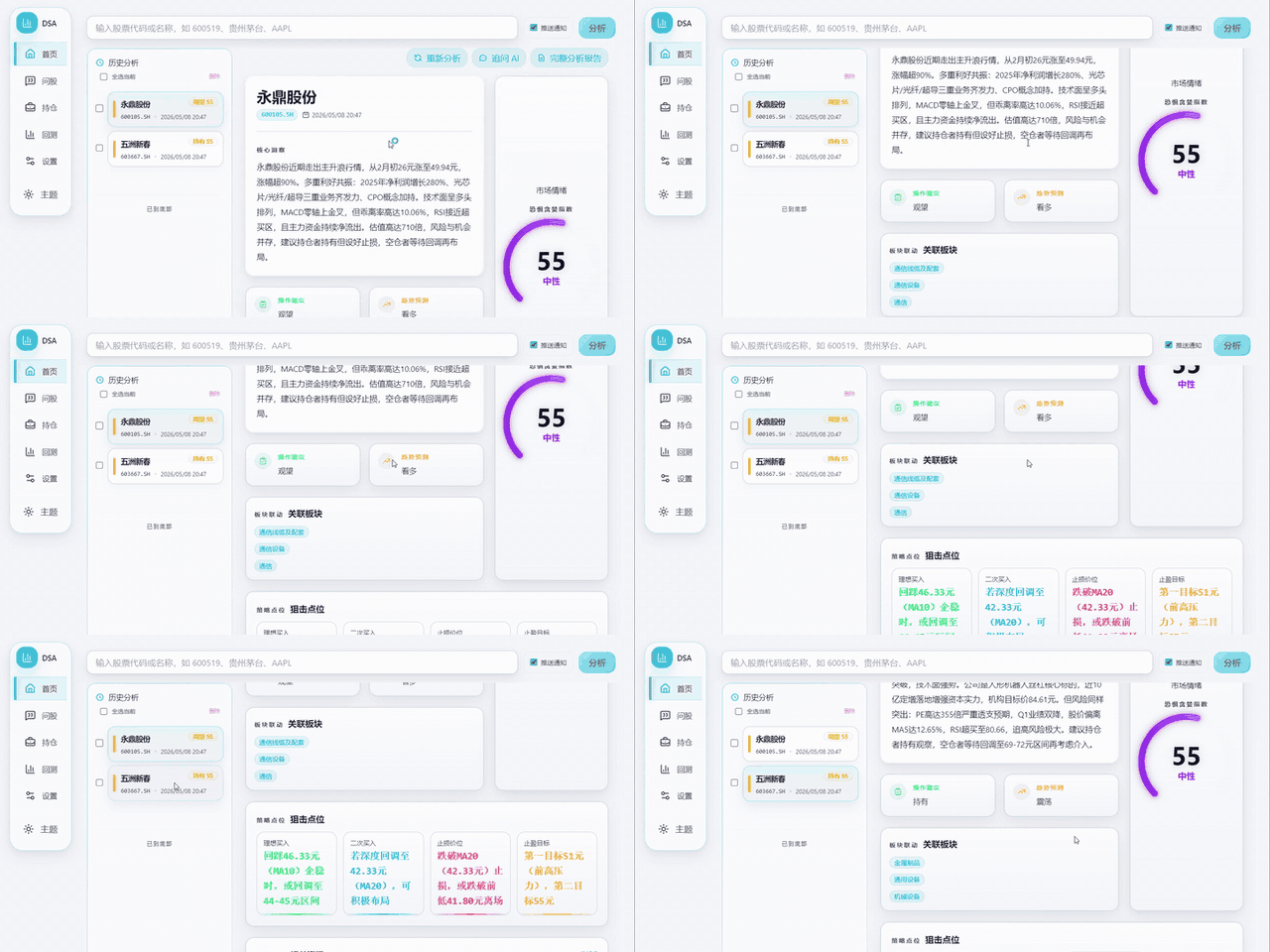
You list stock codes once. At a set time it collects quotes and news for each one, hands them to an LLM and sends back a single message with a verdict, a score, price levels, risks and catalysts. The key idea is that no server is needed: a scheduled GitHub Actions run does the work. The same code on your PC or in Docker adds a web workspace where you can start an analysis by hand and reread past reports.
What people made with it

A write-up of running it on a QNAP NAS with Docker Compose, scheduled for 19:00 every day. On a free model tier, analyzing and pushing three stocks took close to half an hour.
不过我设置的19:00固定执行,但是碍于硅基流动免费额度的响应速度有限,三只股票分析完并推送需要近乎半小时。
How it runs inside
- 1
GitHub Actions → main.py
cron '0 10 * * 1-5' → python main.pyMonday to Friday at 10:00 UTC (18:00 Beijing) the workflow sets up Python 3.11 and runs main.py..github/workflows/00-daily-analysis.yml - 2
main.py → AkShare · YFinance quotes
get_daily_data · get_realtime_quoteFor each stock it fetches daily bars and a live quote, saves them to its database and computes the trend.src/core/pipeline.py - 3
main.py → News search API
search_comprehensive_intelWhen a search service is configured, it gathers the stock's news plus risk and catalyst items.src/search_service.py - 4
main.py → LLM
analyzer.analyzeQuotes, trend and news go to the LLM as one context; a verdict and a score come back.src/analyzer.py - 5
main.py → Dashboard message
generate_dashboard_report → notifier.sendAll stocks are merged into one dashboard, sent to the channels you set and saved as a report file.src/notification.py
What goes in, what comes out
Is it for you
Good for
- Individual investors who want the same evening check on their watchlist every day
- Anyone who wants to try a scheduled job on GitHub Actions without a server
- People who want their own analysis screen on a home NAS or in Docker
Not for
- The README says it is for learning and research and is not investment advice; losses are on the user.
- You bring one LLM API key and one notification channel yourself.
- The README notes the default free data sources can be unstable under rate limits and upstream changes.
- The default README is in Chinese. One user reports close to half an hour for three stocks on a free model tier.
Reviewed by Devalley’s editor before publishing. How the column is made