
graphify: turn a folder into a graph your agent can query
A developer folded three GPTers repos, about 1.52 million words, into one graph with graphify
- Who
- Started by Safi Shamsi as a Claude Code skill; now published by Graphify Labs (YC S26) under Apache-2.0
- When
- Repository opened on 3 April 2026; latest release 0.9.97 on 27 October 2026
- Where
- Claude Code, Codex, Cursor, Gemini CLI and 20+ more assistants · macOS, Linux, Windows · code is parsed on your machine
What was hard
Ask an agent how auth reaches the database in a large repo and it greps, opens file after file, and pieces the answer together. Ask again next session and it reads everything from scratch. When design docs, SQL schemas and paper PDFs sit next to the code, even a person doesn't know where to start.
What it does about it
graphify reads the whole folder once, keeps it as a knowledge graph, and from then on the agent asks the graph instead of the files. Code is parsed on your machine with tree-sitter, so no LLM and no API key, and every edge is tagged as read straight from the source (EXTRACTED) or resolved by graphify (INFERRED). There are no embeddings or vector store: it walks a real graph, so it can show the exact path between two concepts.
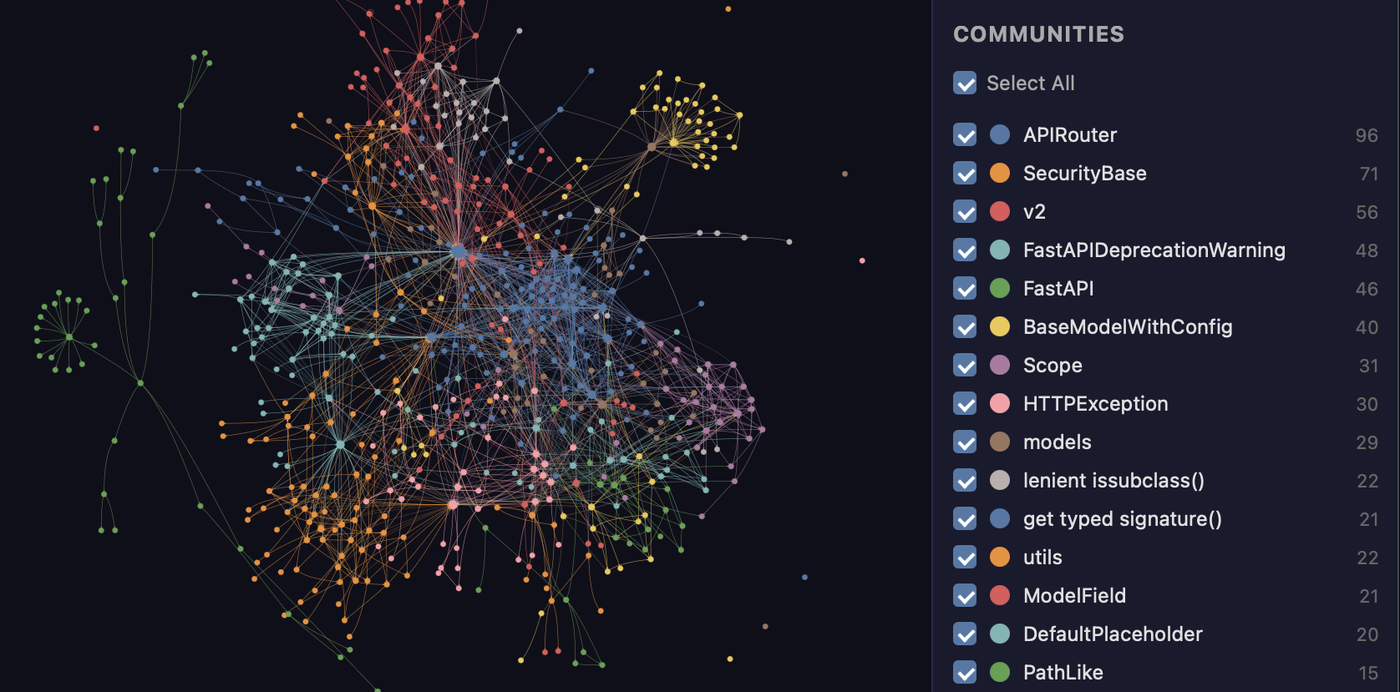
graphify explain "APIRouter"Node: APIRouter Source: routing.py L2210 Community: 2 Degree: 47Connections (47): --> RequestValidationError [uses] [INFERRED] --> .get() [method] [EXTRACTED] <-- __init__.py [imports] [EXTRACTED]graphify path "FastAPI" "ModelField"Shortest path (3 hops): FastAPI --uses--> DefaultPlaceholder <--references-- get_request_handler() --references--> ModelField
What people made with it
Ran graphify over three GPTers repositories (1,643 files, about 1.52 million words) and wrote up the result: 4,942 nodes and 166 communities.
GPTers 3개 레포 152만 단어를 하루 만에 정리한 이야기
Built rootly-graphify-importer, which turns Rootly incidents, alerts and teams into a graphify graph so service failures and on-call gaps can be filtered in graph.html.
Used Graphify to turn incidents into a queryable knowledge graph
How it runs inside
- 1
You → /graphify skill (SKILL.md)
graphify installPuts the skill in ~/.claude/skills/graphify/SKILL.md and registers it in CLAUDE.md and a PreToolUse hookgraphify/install.py - 2
/graphify skill (SKILL.md) → Claude Code
/graphify .Claude Code follows SKILL.md and sorts the folder into code, docs, papers, images and videographify/detect.py - 3
Claude Code → tree-sitter AST extractor
Code files → classes, functions, imports, callsCode is parsed locally with no LLM and kept as EXTRACTED edgesgraphify/extract.py - 4
Claude Code → Semantic subagents
Batches of docs, PDFs, imagesThe Agent tool fans out subagents that return node and edge JSON fragments; skipped for code-only foldersgraphify/skill.md - 5
Claude Code → graphify-out/
Merge → Leiden communities → graph.jsonBoth results are merged into one graph, split into communities by density, and savedgraphify/cluster.py - 6
graphify-out/ → You
graph.html · GRAPH_REPORT.mdA graph you open in a browser and a report of key concepts, surprising links and suggested questionsgraphify/exporters/html.py - 7
Claude Code → graphify-out/
graphify query / path / explainFrom then on questions are answered from graph.json instead of the raw filesgraphify/cli.py
What goes in, what comes out
Is it for you
Good for
- Getting the shape of a large repo you just inherited before reading it
- When your agent re-greps the same files every session
- Projects where code sits next to design docs, SQL schemas and papers
- Repos whose code must not leave the machine (code analysis runs locally)
Not for
- Docs, PDFs and images are read by your assistant's model or a configured API key, which costs tokens; code-only folders cost none.
- Above 5,000 nodes graph.html switches to an aggregated community view (change it with --node-limit).
- Without the leiden extra it clusters with Louvain instead; switching later reshuffles every community.
- An always-on graph, cross-repo links and formal verification belong to the paid Graphify Cloud (14-day free trial).
Reviewed by Devalley’s editor before publishing. How the column is made