
ego lite: the browser that lends your logged-in tabs to your agent, whole
Someone handed their logged-in browser to Claude Code to scrape the Hacker News front page and measured it: one tool call, 16 seconds, twelve cents
- Who
- An MIT repository and a free browser by Citro Labs, for people who want Claude Code, Codex or Cursor to do things on the web for them.
- When
- The repository dates from 2026-04-16; the latest release is v2.1.0 from 2026-10-16.
- Where
- A desktop app for macOS and Windows, Linux on the roadmap. Data stays on your machine; any agent CLI connects via the ego-browser skill.
What was hard
Every time I gave an agent a web task in a separate Playwright browser, it had to log in from scratch and kept hitting captchas. The Chrome-extension kind dragged my own tabs around, so I could do nothing while it worked.
What it does about it
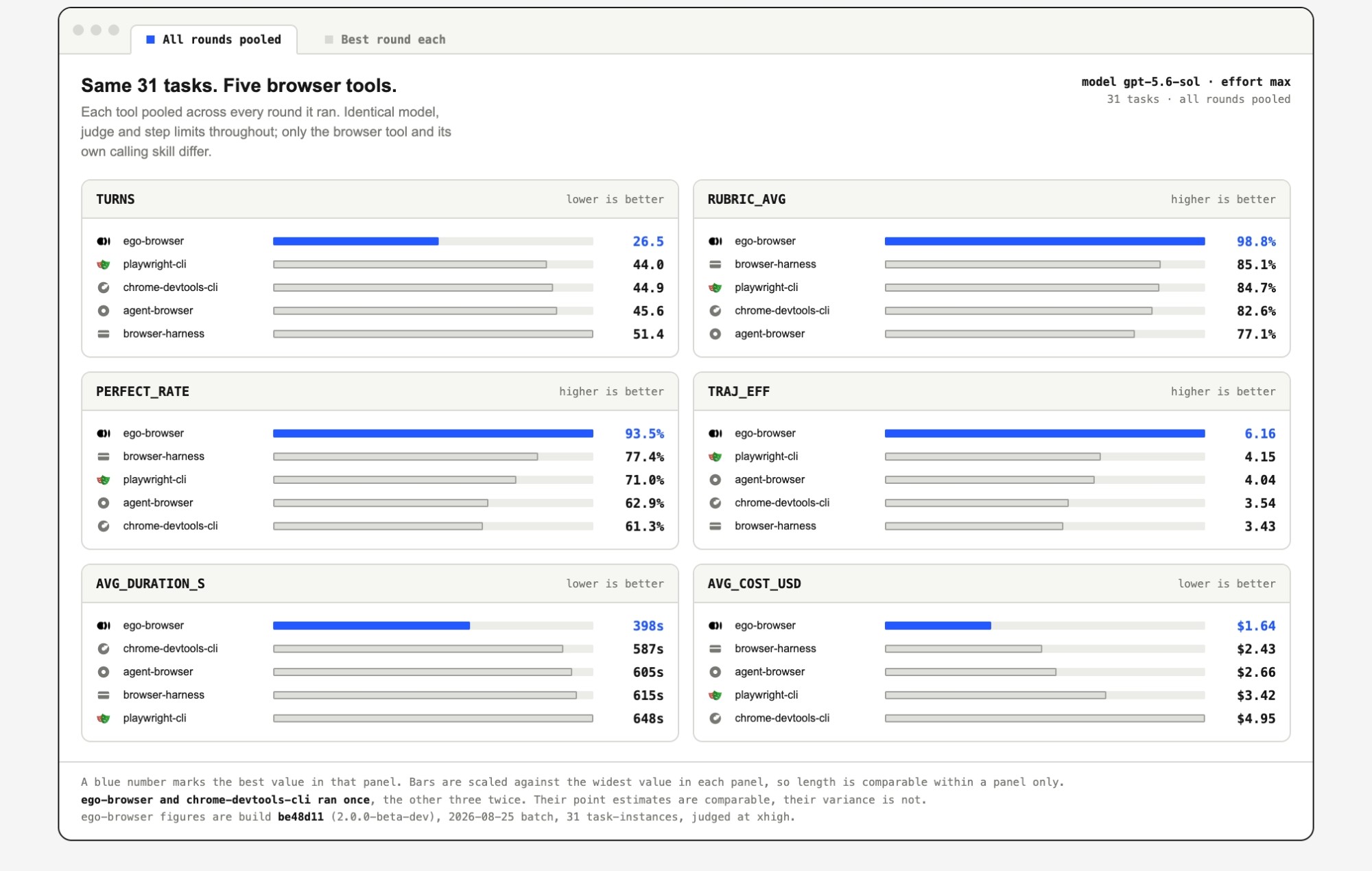
ego lite is a Chromium browser built for you and your agents to share. Migrate your Chrome data on first launch and the agent inherits your logins, cookies, extensions and bookmarks. Each agent gets an isolated Space while you keep browsing up front. The key idea is that the agent writes JavaScript against in-page tools instead of issuing one command at a time, so a multi-step task runs in a single pass.
What people made with it

A hands-on review: v0.5.0.28 driven from Claude Code on three tasks, every token and second counted. Scraping Hacker News took one call and 16.4 seconds; a logged-in check got it wrong.
At its best it was the cheapest agent browsing I have ever measured — one tool call, 16 seconds, twelve cents.
A video post showing the agent opening its own tabs in its Space and doing the task while the author's mouse never moves.
Built with ego lite, a browser where you and your agents run in parallel.
After trying it, they wrote that unlike browser automation that juggles tools, sessions and tabs, here you and your agents work side by side in one browser.
Just checked out @ego_agent ego lite and liked the browser-first approach they took for agent workflows!
How it runs inside
- 1
You → Claude Code
/ego-browser plus what to doThe entry skill only tells the agent to run ego-browser skill and read the guide that matches the installed browserskills/ego-browser/SKILL.md - 2
Claude Code → ego-browser skill
ego-browser skillThe app prints the usage guide bundled with the same SDK version (skill-body/SKILL.md), unchangeddocs/ego-browser-skill-command.md - 3
Claude Code → ego-browser CLI
a JS script into ego-browser nodejsReads the script from stdin and runs it as one async function with helpers such as taskSpace and page pre-importedpackage/ego-browser/src/run.ts - 4
ego-browser CLI → ego lite Space
taskSpace('name') → page('p1').goto(url)Opens an isolated Space inside the same browser and drives the page over CDP; logins and cookies carry overpackage/ego-browser/src/browser-runtime.ts - 5
ego lite Space → ego-browser CLI
page.snapshot(): page text with @refsThe agent fills, clicks and waits by refs like @21 in the same script, then prints a fresh snapshot lastpackage/ego-browser/skill-body/SKILL.md - 6
ego-browser CLI → task result
console.log output + task.finish()Buffered output flushes to the agent when the run ends, and the Space closes unless pages are keptpackage/ego-browser/src/output-sink.ts
What goes in, what comes out
Is it for you
Good for
- Collecting information or filling forms on sites that need your login
- Keeping your own browsing going while the agent works in the same browser
- Running several jobs at once, one Space each
- Staying with the agent you already use, such as Claude Code, Codex or Cursor
Not for
- macOS and Windows only; Linux is on the roadmap
- The browser app is a separate free download; the repository's MIT license covers the skill and SDK
- The speed and cost comparisons in the README are the maker's own benchmark
- The experience-accumulation feature is marked 'coming soon' in the README
Reviewed by Devalley’s editor before publishing. How the column is made