
agent-desktop: a CLI that lets agents click desktop apps
Without a single screenshot, your agent reads a Finder or Slack window as JSON and presses its buttons
- Who
- A Vercel Labs repository; every 1.2.0 change came from lahfir. For anyone handing an agent work in desktop apps, not just the browser.
- When
- The repository opened on February 19, 2026. After 1.1.0 on November 3, 1.2.0 on November 5 added agent-desktop mcp.
- Where
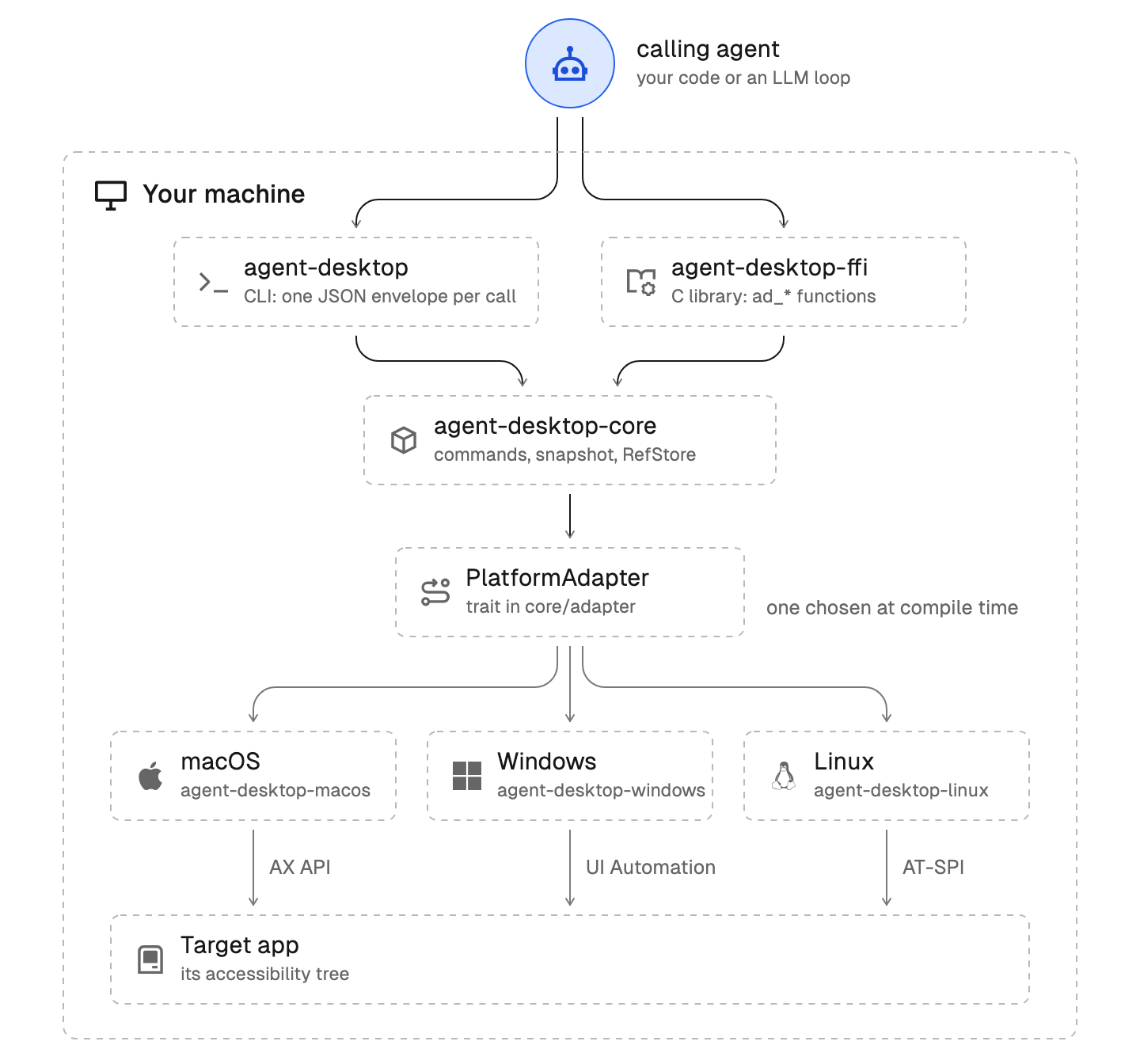
- Runs on your own machine: macOS 13+, Windows 10 1809+, Ubuntu 24.04+. Shell agents use the CLI; MCP clients use its MCP server.
What was hard
Ask an agent for anything outside the browser and it stalls. Ticking a box in a settings window or opening a folder in Finder means taking a screenshot, guessing coordinates, clicking, and taking another screenshot to see if it worked.
What it does about it
agent-desktop reads the operating system's accessibility tree instead of the screen. It returns the app window as JSON with a ref on every actionable element; the agent clicks or types on a ref, then snapshots again to verify. It is headless by default, so it neither moves your pointer nor steals focus, and when the UI has changed under a ref it refuses rather than clicking the wrong thing.
agent-desktop snapshot --app Finder -i # interactive elements, each with a ref{"ok": true,"command": "snapshot","app": "Finder","ref_count": 59,{ "role": "treeitem", "name": "Documents", "ref_id": "@s8f3k2p9:e8", "available_actions": ["Click"] }agent-desktop click @s8f3k2p9:e8 # act on a ref from that snapshotagent-desktop snapshot --app Finder -i # observe again to verify
What people made with it
Flavio ran 1.0.2 on Ubuntu 24.04 XFCE, found Mousepad's text field with a snapshot, changed it with set-value, and checked that only the unsaved buffer changed, not the file on disk.
The app was Mousepad, the XFCE text editor.
How it runs inside
- 1
You → Your agent
Open Documents in FinderThe agent follows the skill's loop: read, act, then read again to verify.skills/agent-desktop/SKILL.md - 2
Your agent → agent-desktop CLI
agent-desktop snapshot --app Finder -iOver MCP the same command is the desktop_snapshot tool; the tool list is built straight from the CLI's commands.src/mcp/catalog.rs - 3
agent-desktop CLI → AX · UI Automation · AT-SPI
Read the app's accessibility treeOn macOS, PlatformAdapter calls the AX API; on Windows and Linux their own crates do the same.crates/macos/src/adapter.rs - 4
agent-desktop CLI → Your agent
JSON envelope with refsEvery actionable element gets a ref such as @s8f3k2p9:e8, valid only for that snapshot.crates/core/src/refs/ref_alloc.rs - 5
Your agent → agent-desktop CLI
agent-desktop click @s8f3k2p9:e8Before acting it finds the element again; if the UI changed, it refuses with STALE_REF.crates/core/src/refs/resolve_saved_ref.rs - 6
agent-desktop CLI → Changed window and JSON result
Click through the accessibility APIThe pointer and focus stay where they are; the agent snapshots the same window again to check.crates/core/src/commands/click.rs
What goes in, what comes out
Is it for you
Good for
- Handing an agent desktop apps such as Finder, Notes or a settings window, not just web pages
- Letting an agent drive apps without taking over your mouse and focus
- Adding desktop control to the MCP client you already use
- Driving macOS, Windows and Linux with the same commands
Not for
- On macOS you grant the Accessibility permission yourself on first use.
- Physical input such as double-click, hover or drag needs --headed, and what works headless differs by OS.
- Snapshots, clipboard reads and screenshots can hold private desktop content; keep them out of public logs.
- Apache-2.0: companies may use, modify and redistribute it, keeping the license notice with any copy they ship.
Reviewed by Devalley’s editor before publishing. How the column is made