
Digital Human Koubo: 사진 한 장으로 만드는 AI 진행자 영상
만든 사람이 사진 한 장과 문장 하나로 27초 라이브 광고를 뽑았어요. 든 비용은 482 크레딧이에요
- 누가
- Berryxia(andyhuo520)가 MIT 라이선스로 공개한 에이전트 스킬이에요. 저장소 자체도 Claude Code로 만들었다고 적혀 있어요.
- 언제
- 2026년 10월 26일에 저장소를 열고, 같은 날 데모 영상을 담은 v1.0.0을 냈어요.
- 어디서
- Claude Code에서 시험했고 Codex·OpenClaw·WorkBuddy도 같은 스크립트로 돌아간다고 해요. 생성은 Renoise 클라우드, 편집은 내 컴퓨터에서 해요.
이게 불편했어요
AI 영상 모델은 한 번에 15초 남짓만 만들어요. 몇 분짜리 영상을 만들려면 조각마다 프롬프트를 쓰고, 받아서 대본대로 말했는지 듣고, 따로 생성돼 울림이 제각각인 목소리를 맞추고, 그 위에 자막과 그래픽을 또 얹어야 했어요.
그래서 이렇게 풀어요
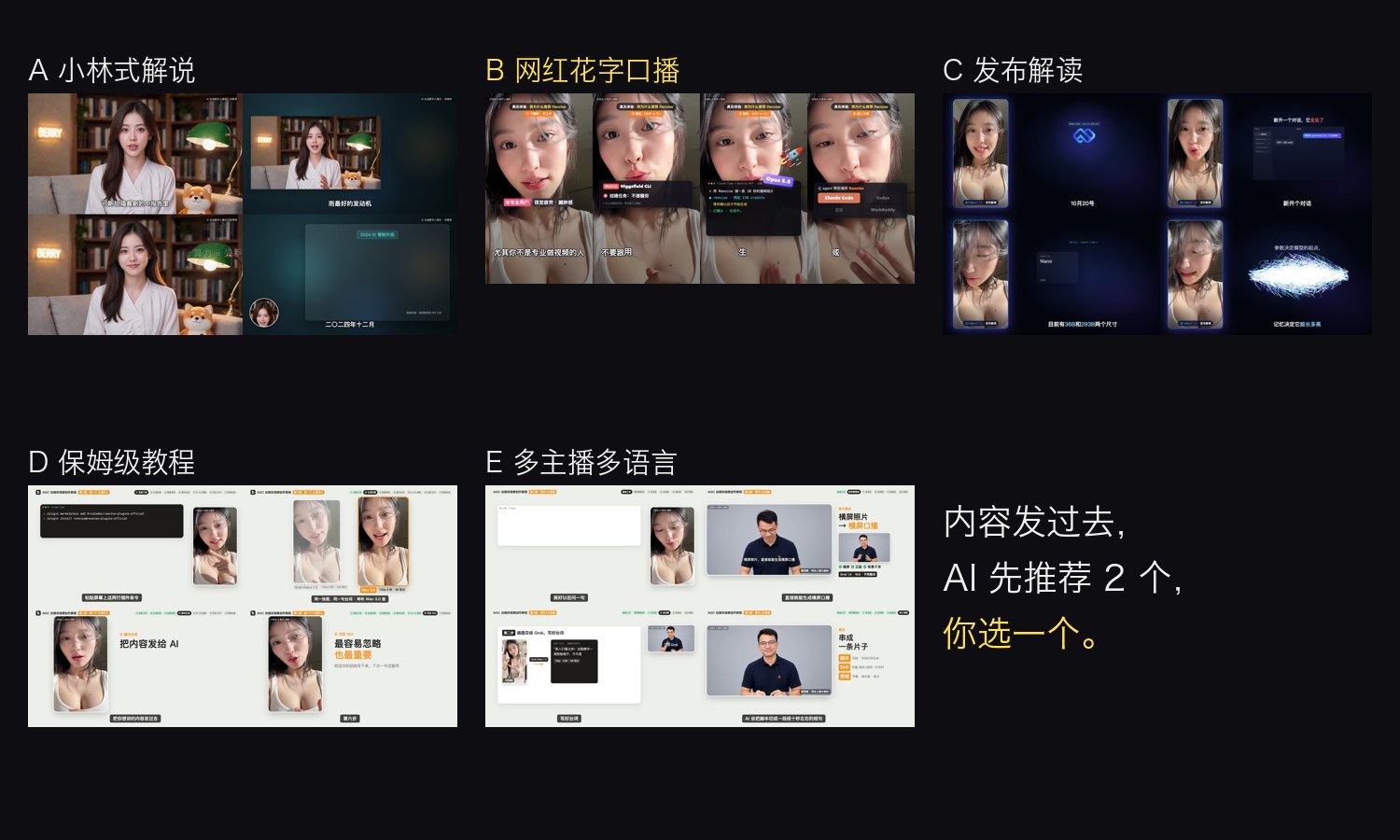
이 스킬은 그 일을 에이전트가 따라 할 순서로 묶었어요. 대본을 조각으로 나눈 뒤 크레딧 견적부터 보여 주고, 동의를 받으면 첫 조각만 만들어 확인받은 다음 나머지를 한꺼번에 생성해요. 받아 온 조각은 whisper로 대본과 대조하고, 서른 개 클립도 한자리에서 녹음한 것처럼 목소리를 다듬은 뒤, 고른 스타일과 48개 포장 컴포넌트로 Remotion에서 렌더링해요.
안에서는 이렇게 돌아가요
- 1
나 → Claude Code
내용 붙여넣기 → 스타일 2개 추천 → brief.json내용을 한 줄로 진단해 다섯 스타일 중 두 개를 미리보기와 함께 권하고, 비율·길이·자막 강도·진행자를 한 번에 물어요.skills/digital-human-koubo/SKILL.md - 2
Claude Code → build_tasks.py
script.json (조각당 15초 이하)글자 수를 초당 5.4자로 나누고 1초를 더해 조각 길이를 정하고, 15초를 넘는 조각이 있으면 나눠 오라며 멈춰요.skills/digital-human-koubo/scripts/build_tasks.py - 3
build_tasks.py → 나
조각 수 · 초 · 예상 크레딧720p는 초당 17, 화면 속 화면용 480p는 초당 10 크레딧으로 견적을 내요. 동의해야 생성이 시작돼요.skills/digital-human-koubo/scripts/build_tasks.py - 4
Claude Code → Renoise MCP · Grok Video 1.5
tasks.json 10개씩 create_tasks → 내려받기참조 사진과 프롬프트를 붙인 작업을 보내고, 결과는 rangedl.py가 6구간으로 나눠 이어받은 뒤 ffmpeg로 디코딩해 확인해요.skills/digital-human-koubo/scripts/rangedl.py - 5
Renoise MCP · Grok Video 1.5 → assemble.py · whisper
renoise-<taskId>.mp4whisper로 받아써 대본과 비교하고 85% 밑이면 표시해요. 말이 끝나고 0.25초까지만 남겨 이어 붙이고 -16 LUFS로 맞춰요.skills/digital-human-koubo/scripts/assemble.py - 6
assemble.py · whisper → Remotion으로 렌더한 MP4
tl.json 글자 단위 시간표 → 렌더align.py가 글자마다 시각을 매기면, 스타일 템플릿과 pack 목록의 포장 컴포넌트가 그 시각에 맞춰 화면에 나와요.skills/digital-human-koubo/scripts/align.py
넣으면 이렇게 나와요
나한테 맞을까요
이럴 때 좋아요
- 얼굴을 직접 찍지 않고 같은 진행자로 숏폼이나 해설 영상을 꾸준히 올리고 싶을 때
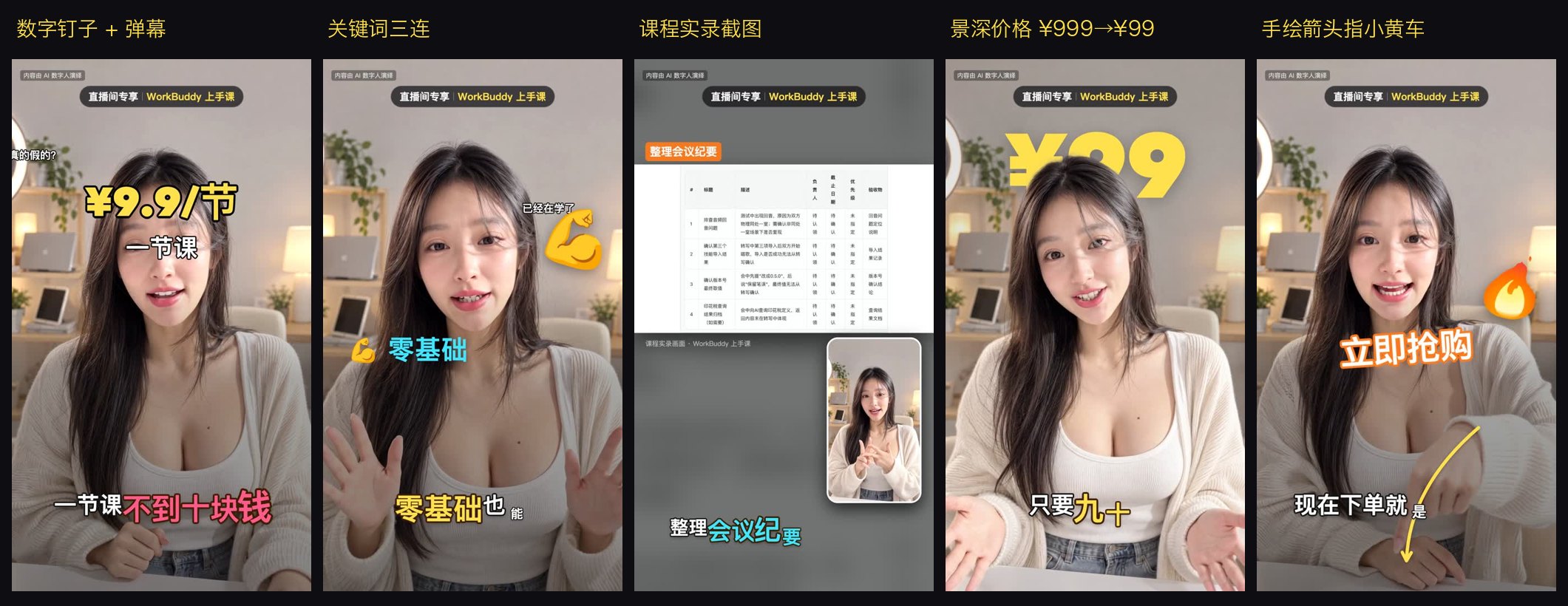
- 가격·숫자를 크게 보여 줘야 하는 9:16 상품 소개나 라이브 광고
- 생성 비용을 먼저 보고 조각 단위로 다시 찍고 싶을 때
- Claude Code나 Codex에서 원격 MCP와 로컬 명령을 이미 쓰고 있을 때
이건 안 돼요
- 영상 생성은 Renoise 계정의 크레딧을 써요. 27초 광고가 482, 4분 36초 튜토리얼이 약 3,250 크레딧이었어요.
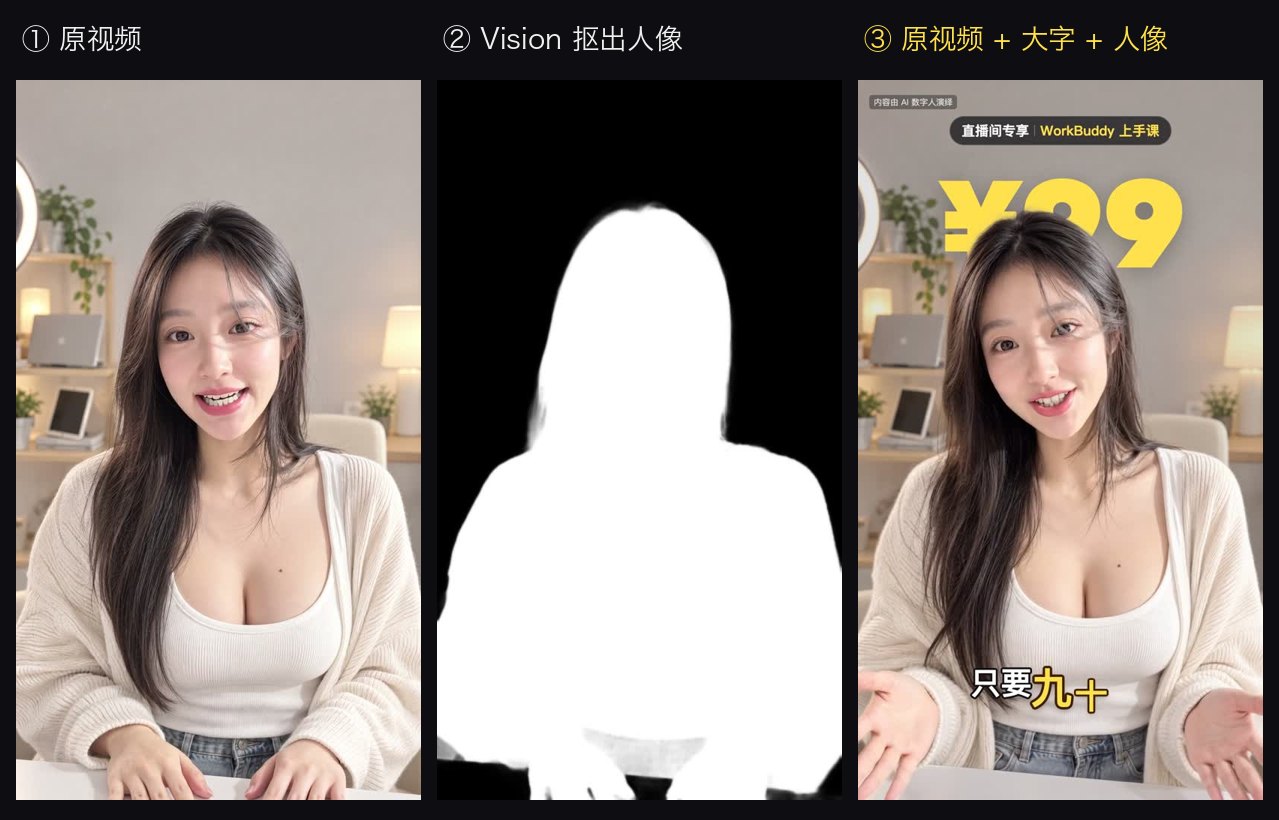
- 진행자 뒤 글자 효과는 Apple Vision을 써서 macOS에서만 돼요.
- Remotion은 개인과 3명 이하 회사만 무료이고, 그보다 큰 회사는 회사 라이선스가 필요해요.
- Grok 목소리를 다른 음성으로 바꾸면 입 모양이 약 100ms 어긋나요. 얼굴과 목소리는 본인 것이나 허락받은 것만 써야 해요.
발행 전에 Devalley 편집자가 검토했어요. 칼럼은 어떻게 만드나요
Digital Human Koubo: AI presenter videos from one photo
Its author turned one photo and one sentence into a 27-second livestream ad for 482 credits.
- Who
- Published under MIT by Berryxia (andyhuo520) as an agent skill. The README says the repository itself was built with Claude Code.
- When
- The repository opened on October 26, 2026, and v1.0.0 with the demo videos came out the same day.
- Where
- Tested in Claude Code; Codex, OpenClaw and WorkBuddy should run the same scripts. Generation on Renoise's cloud, editing on your machine.
What was hard
AI video models make about 15 seconds at a time. A video of several minutes meant writing a prompt per clip, listening to each one to check it said the script, evening out voices that each came from a different generation, and then laying captions and graphics on top.
What it does about it
The skill turns that into steps an agent follows. It cuts the script into segments, quotes the credits first, generates only the first segment once you agree, and batches the rest after you have checked it. Every clip is compared with the script by whisper, the voices are matched so thirty clips sound like one recording, and the chosen style and 48 packaging components are rendered in Remotion.
How it runs inside
- 1
You → Claude Code
paste content → 2 styles suggested → brief.jsonA one-line diagnosis suggests two of five styles with previews, then asks ratio, length, captions and presenter at once.skills/digital-human-koubo/SKILL.md - 2
Claude Code → build_tasks.py
script.json (≤ 15 s per segment)Each segment's length is characters ÷ 5.4 per second + 1 s; any segment over 15 s stops the run until it is split.skills/digital-human-koubo/scripts/build_tasks.py - 3
build_tasks.py → You
segments · seconds · estimated credits720p costs 17 credits a second, 480p picture-in-picture 10; nothing is generated until you agree.skills/digital-human-koubo/scripts/build_tasks.py - 4
Claude Code → Renoise MCP · Grok Video 1.5
tasks.json in batches of 10 → downloadTasks carry the reference photo and prompt; rangedl.py fetches each clip in 6 resumable ranges, then ffmpeg decodes it.skills/digital-human-koubo/scripts/rangedl.py - 5
Renoise MCP · Grok Video 1.5 → assemble.py · whisper
renoise-<taskId>.mp4whisper transcribes each clip and flags it under 85% match; it keeps 0.25 s after speech, joins clips at -16 LUFS.skills/digital-human-koubo/scripts/assemble.py - 6
assemble.py · whisper → MP4 rendered in Remotion
tl.json word timeline → renderalign.py times every character, and the style template and pack components appear on those times.skills/digital-human-koubo/scripts/align.py
What goes in, what comes out
Is it for you
Good for
- Posting short or explainer videos regularly with the same presenter, without filming yourself
- 9:16 product picks or livestream ads where prices and numbers need to stand out
- Seeing the generation cost up front and re-shooting one segment at a time
- People already using remote MCP servers and local commands in Claude Code or Codex
Not for
- Generation spends credits on your Renoise account: 482 for the 27-second ad, about 3,250 for the 4:36 tutorial.
- The text-behind-the-presenter effect uses Apple Vision and runs on macOS only.
- Remotion is free for individuals and companies of up to 3 people; larger companies need a company license.
- Swapping Grok's voice for another leaves the lips about 100 ms off. Use only your own face and voice, or ones you have permission for.
Reviewed by Devalley’s editor before publishing. How the column is made