
rea-video: 영상을 숏마다 뜯어 만든 법을 알려 주는 스킬
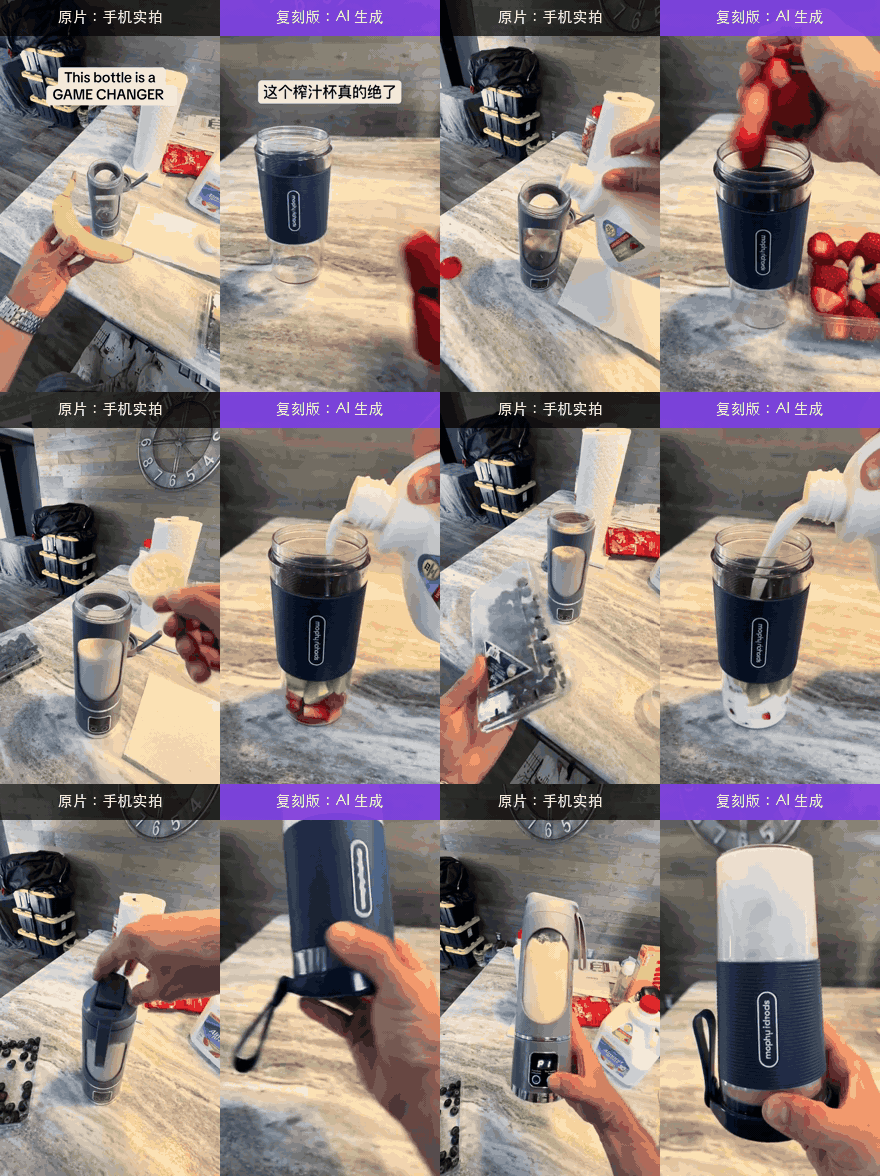
상품을 바꾼 AI 리메이크 광고를 넣으니 「전부 AI, 8숏은 3번 생성이면 된다」고 갈라 낸 스킬
- 누가
- JuneYaooo가 만든 오픈소스(Apache-2.0). 잘 만든 영상을 보고 어떻게 만들었는지 알고 싶은 크리에이터와 마케터용이에요.
- 언제
- 2026년 10월 29일 공개, 아직 정식 릴리스 없이 매일 고쳐지는 중이에요(11월 7일 기준).
- 어디서
- Claude Code, Codex처럼 명령을 실행하는 에이전트에서, 내 PC의 ffmpeg와 Python 3.10+로 돌아가요. 시각 모델은 선택이에요.
이게 불편했어요
잘 만든 숏폼 광고를 보면 따라 만들고 싶어지는데, 어디까지 찍은 거고 어디부터 AI인지 눈으로는 잘 안 보여요. 플랫폼에서 받은 영상은 재압축돼 단서도 지워져 있고, 자막 타이밍이나 배경음악 BPM은 하나하나 재 봐야 했어요.
그래서 이렇게 풀어요
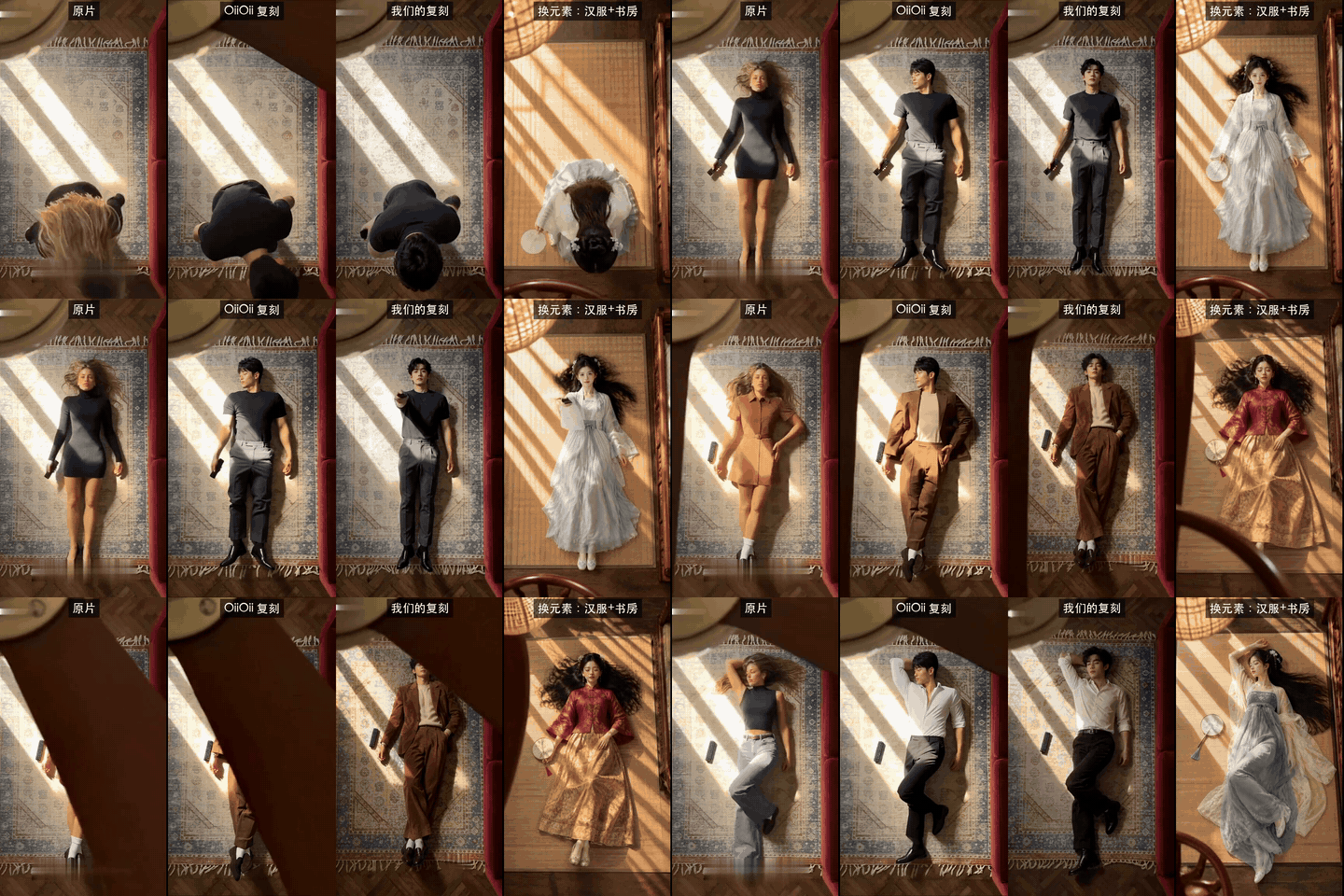
영상 하나를 주면 숏을 나누고 목소리·음악·효과음을 갈라낸 뒤, 숏마다 실사·AI 영상·3D·코드 렌더 등 11가지 중 무엇인지 증거와 함께 판정해요. 핵심은 「그럴듯해 보인다」보다 프레임 주기, 센서 노이즈, 메타데이터의 AIGC 표시 같은 측정값을 먼저 믿는다는 점이에요. 판정이 엇갈린 숏은 에이전트가 직접 이미지를 보고 다시 검토하고, 끝에 찍을 것·생성할 것·코드로 만들 것을 나눈 리메이크 계획을 줘요.
이걸로 만든 사람들
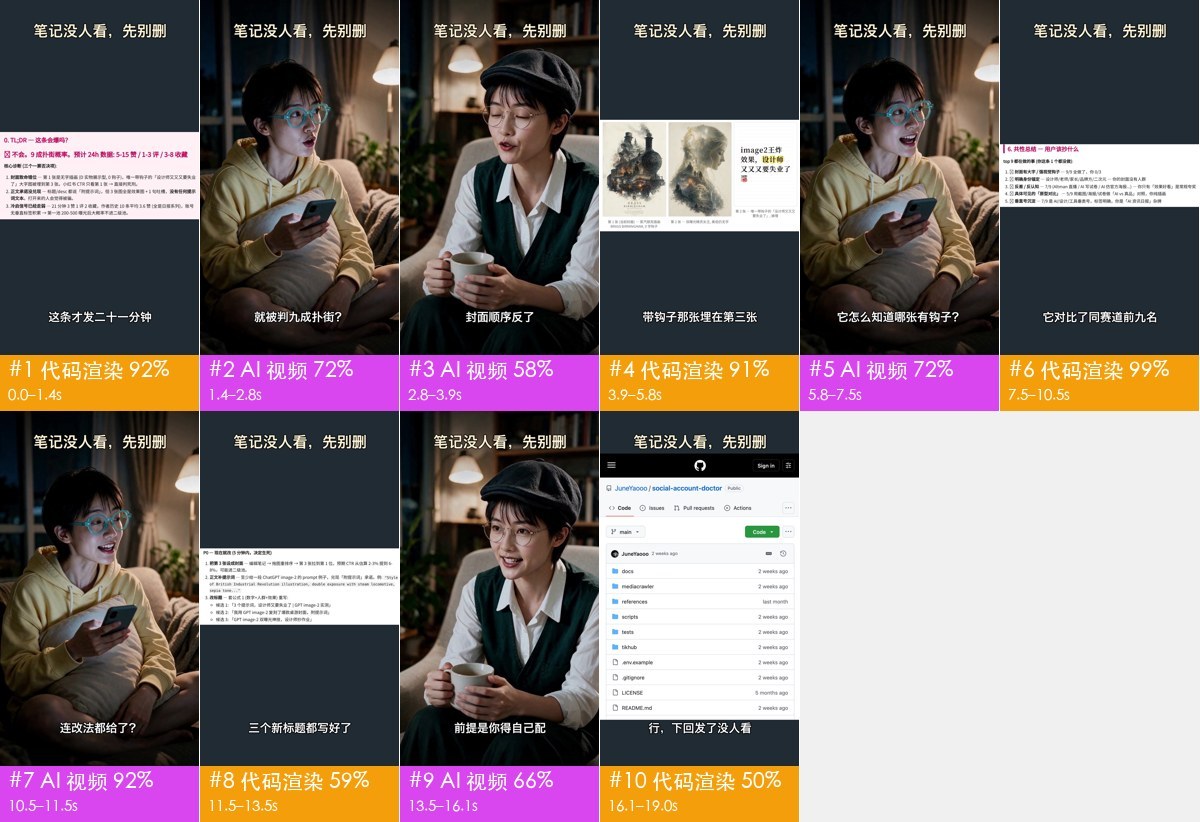
123초짜리 더우인 토킹헤드 영상을 돌려 에이전트가 15개 숏을 하나씩 다시 봤어요. 어두운 배경의 실사 근경이 AI로 남는 문제를 찾아 고친 PR까지 냈어요.
一条 123s 的抖音口播视频(暗背景、单侧灯条、近景、无运镜),agent 看图复核后对 15 个镜头逐镜给出 label_probs
안에서는 이렇게 돌아가요
- 1
- 2
Claude Code → rea-video 스킬 (SKILL.md)
표준 흐름 읽기분해, 요약, 이미지 검토, 반영 순서와 「확실하지 않으면 확인 필요라고 쓰기」 원칙을 읽어요.skills/rea-video/SKILL.md - 3
Claude Code → rea-video CLI
rea-video decompose ref.mp4 -o out/refCLI가 분해 명령을 받아 파이프라인을 시작해요.rea_video/cli.py - 4
rea-video CLI → breakdown.json
숏 경계와 목소리·음악 분리장면 전환으로 숏을 자르고 오디오를 목소리, 음악, 효과음 트랙으로 나눠요.rea_video/shots.py - 5
rea-video CLI → breakdown.json
숏마다 11가지 중 판정AIGC 표시와 프레임 주기 같은 강한 증거를 「그럴듯해 보임」보다 먼저 써서 확률을 매겨요.rea_video/classify.py - 6
Claude Code → breakdown.json
rea-video review → apply-review확신이 낮은 숏은 에이전트가 이미지를 직접 보고 답을 적어 결과에 합쳐요.rea_video/review.py - 7
breakdown.json → report.html
숏별 증거·프롬프트·리메이크 계획무엇을 찍고, 무엇을 생성하고, 무엇을 코드로 만들지 나눈 보고서를 써요.rea_video/report.py
넣으면 이렇게 나와요
나한테 맞을까요
이럴 때 좋아요
- 잘 된 숏폼 광고가 어떻게 찍혔는지 배우고 싶을 때
- 실사인지 AI인지 근거를 갖고 판단해야 할 때
- 리메이크 전에 촬영, 생성, 코드 작업을 나눠 견적을 내고 싶을 때
- 자막 타이밍을 SRT나 ASS로 뽑고 싶을 때
이건 안 돼요
- 상세 문서는 아직 중국어예요(README 기준). 보고서는 중국어나 영어로 나와요.
- 플랫폼에서 받은 재압축 영상은 도구만으로 88.6%라서, 시각 모델이나 에이전트 검토를 더하는 게 좋아요(README 기준).
- 영상을 직접 렌더하지는 않아요. 자동 생성은 capsule-cinema 쪽이고 유료 모델을 불러요.
- 남의 영상 소재를 그대로 다시 올리는 용도가 아니에요. 권리가 있는 소재로 다시 만들라고 해요.
rea-video: a skill that tells how each shot was made
Given an AI remake of a TikTok ad, it answered: all AI, and its 8 shots take 3 generations
- Who
- Open source by JuneYaooo (Apache-2.0), for creators and marketers who see a good video and want to know how it was made.
- When
- Published on 29 October 2026; no tagged release yet, with commits landing daily (as of 7 November).
- Where
- Runs in Claude Code, Codex or any agent that runs commands, on your own machine with ffmpeg and Python 3.10+. A vision model is optional.
What was hard
A good short ad makes you want to try one yourself, but you can't tell by eye which parts were filmed and which were generated. Downloads from the platform are recompressed, so the clues are gone, and caption timing or the music's tempo had to be measured by hand.
What it does about it
Give it a video and it cuts it into shots, separates voice, music and effects, and labels each shot as one of 11 kinds, from live footage and AI video to 3D and code renders, with the evidence. Measurements come first: frame cadence, sensor noise and AIGC tags in the metadata outrank how a shot looks. Shots where the signals disagree go to your agent to look at, and the result is a remake plan split into what to film, what to generate and what to code.
What people made with it
Ran a 123-second Douyin talking-head video and had the agent review all 15 shots, found that dark close-ups of a real person stayed labelled AI, and sent a fix.
一条 123s 的抖音口播视频(暗背景、单侧灯条、近景、无运镜),agent 看图复核后对 15 个镜头逐镜给出 label_probs
How it runs inside
- 1
You → Claude Code
One line: the repo and a video pathWith the README's line, the agent installs the CLI and learns the workflow.README.md - 2
Claude Code → rea-video skill (SKILL.md)
Reads the standard flowDecompose, summary, visual review, apply, and the rule to write 'unconfirmed' rather than guess.skills/rea-video/SKILL.md - 3
Claude Code → rea-video CLI
rea-video decompose ref.mp4 -o out/refThe CLI takes the command and starts the pipeline.rea_video/cli.py - 4
rea-video CLI → breakdown.json
Shot cuts, voice and music apartIt cuts at scene changes and separates the audio into voice, music and effects.rea_video/shots.py - 5
rea-video CLI → breakdown.json
One of 11 kinds per shotHard evidence such as AIGC tags and frame cadence outranks 'looks like' when it scores each shot.rea_video/classify.py - 6
Claude Code → breakdown.json
rea-video review, then apply-reviewFor low-confidence shots the agent looks at the frames itself and its answers are merged in.rea_video/review.py - 7
breakdown.json → report.html
Evidence, prompts and a remake planThe report splits the remake into what to film, what to generate and what to code.rea_video/report.py
What goes in, what comes out
Is it for you
Good for
- Learning how a well-performing short ad was shot
- Deciding with evidence whether footage is real or generated
- Splitting a remake into filming, generation and code before you price it
- Pulling caption timing out as SRT or ASS
Not for
- The detailed docs are in Chinese for now; reports come out in Chinese or English (per the README).
- On recompressed platform downloads the tools alone reach 88.6%, so add a vision model or agent review (per the README).
- It doesn't render video; automatic generation is capsule-cinema's job and calls paid models.
- It isn't for reposting other people's footage; remake with material you have the rights to.