
unslop: AI가 만든 티 나는 화면을 디자인된 화면으로 고치는 Claude 스킬
바이브코딩한 대시보드를 고치는 과정을 올린 X 영상이 좋아요 1만 6천 개를 넘겼고, 그 방법이 Claude 스킬로 나왔어요
- 누가
- X에서 Unslopping 시리즈를 연 Damir Sokolovsky(@heydamir)가 만들었어요. 바이브코딩한 화면이 AI가 만든 티가 나서 고민인 사람을 위한 스킬이에요.
- 언제
- 2026년 10월 29일에 저장소가 열렸어요. 릴리스 태그는 아직 없어요.
- 어디서
- Claude Code 스킬이에요. Next.js, React, Vue, Svelte, Tailwind, 순수 HTML/CSS 화면에 쓰고, 코드 없이 라이브 사이트 링크만 줘도 돼요.
이게 불편했어요
에이전트에게 화면을 맡기면 기능은 금방 돌아가는데, 모든 카드가 빛나고 라벨마다 이모지가 붙고 간격은 그날그날 달라요. 어딘가 이상한 건 알겠는데, 디자이너가 아니면 무엇부터 손대야 할지 짚기 어려웠어요.
그래서 이렇게 풀어요
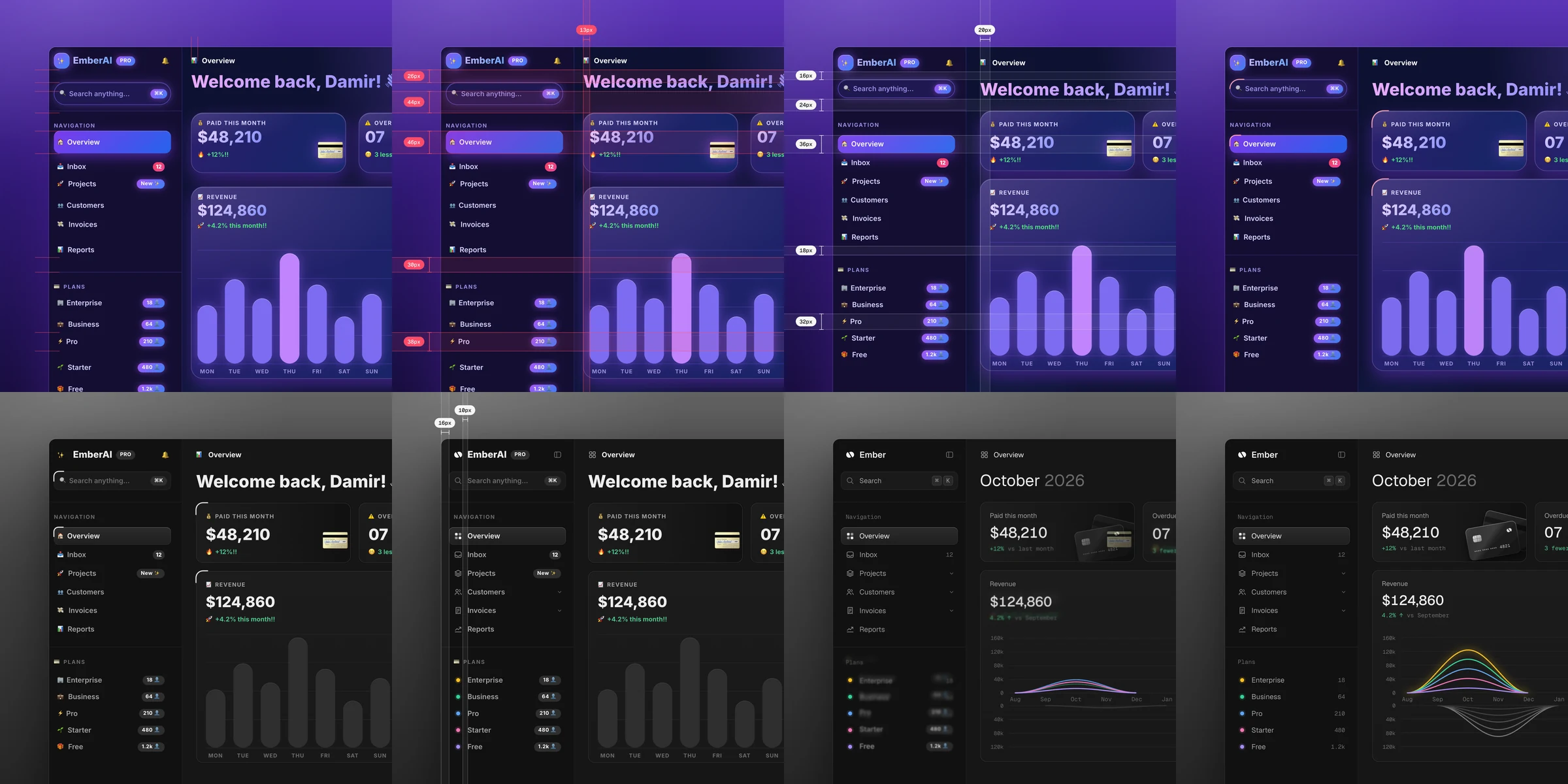
unslop은 고치기 전에 먼저 화면에서 AI 티가 나는 곳을 하나씩 찾아 어디에 있는지 적어요. 그다음 제품이 무엇을 하는지에서 성격, 세계, 색이 몰릴 한두 곳, 시그니처 디테일을 정해 보여 주고, 내가 답하면 디자이너가 레드라인 리뷰를 하듯 간격부터 모션까지 한 겹씩 고쳐요. 화면이 이미 괜찮으면 그렇다고 말하고 작은 손질 몇 가지만 권해요.
안에서는 이렇게 돌아가요
- 1
나 → Claude Code (unslop)
/unslop this dashboard명령으로 부르거나 말로 부탁해도, Claude가 스킬 설명을 보고 unslop을 골라 화면 파일부터 찾아요.skills/unslop/SKILL.md - 2
Claude Code (unslop) → references/signs.md
징후 목록으로 감사보라 그라데이션, 색 글로우, 이모지 아이콘, 대문자 라벨, 제멋대로 간격마다 위치와 고칠 방법을 한 줄씩 적어요.skills/unslop/references/signs.md - 3
Claude Code (unslop) → 나
감사 목록 + 방향 다섯 줄제품, 성격, 세계, 모먼트, 시그니처를 보여 주고, 내 답을 들은 뒤에야 파일을 고치기 시작해요.skills/unslop/SKILL.md - 4
references/tokens.md → Claude Code (unslop)
4px 간격 단위, 회색 램프, 서체 값간격, 색, 아이콘, 문구, 타이포, 레이아웃, 디테일, 비주얼, 모션을 이 순서로 한 겹씩 고칠 때 쓰는 시작값이에요.skills/unslop/references/tokens.md - 5
Claude Code (unslop) → 고친 화면과 정사각 영상
프로젝트 스택 그대로 고친 화면기능과 섹션 순서는 그대로 두고, 체크리스트로 다시 렌더해 감사 목록에 남은 것이 없는지 확인해요.skills/unslop/SKILL.md - 6
Claude Code (unslop) → scripts/story.mjs
node story.mjs story.html unslop-story.mp4단계마다 CSS만 덧씌운 story.html을 Playwright로 열고, 값이 바뀌는 모습을 초당 60장씩 찍어요.skills/unslop/scripts/story.mjs - 7
scripts/story.mjs → 고친 화면과 정사각 영상
ffmpeg로 묶은 정사각 MP4빨간 측정선과 unslop by @heydamir 크레딧이 들어간 영상이 나와요. --wide를 주면 16:9예요.skills/unslop/scripts/story.mjs
넣으면 이렇게 나와요
나한테 맞을까요
이럴 때 좋아요
- 바이브코딩으로 만든 대시보드나 랜딩 페이지가 템플릿처럼 보일 때
- 디자이너 없이 출시 전에 화면을 한 번 다듬고 싶을 때
- 코드는 없고 라이브 사이트 링크만 있는데 고친 시안이 필요할 때
- 고쳐지는 과정을 SNS에 올릴 짧은 영상이 필요할 때
이건 안 돼요
- 스토리 영상은 Playwright와 ffmpeg가 있어야 만들 수 있고, 작업 시간이 몇 분 더 걸려요.
- 히어로 이미지 생성은 fal, Replicate, OpenAI images, Higgsfield 같은 이미지 서비스가 있어야 하고, 유료 생성 전마다 프롬프트를 보여 주고 물어봐요.
- 링크나 스크린샷만 줬을 때는 실제 사이트가 아니라 다시 만든 페이지 코드를 돌려줘요. 실제 반영은 사이트를 가진 사람이 해야 해요.
- CC BY 4.0이라 회사에서도 쓰고 고칠 수 있지만, Damir Sokolovsky(@heydamir) 크레딧과 저장소 링크를 남겨야 해요.
발행 전에 Devalley 편집자가 검토했어요. 칼럼은 어떻게 만드나요
unslop: a Claude skill that fixes AI-looking UI
Its maker's X video of a vibecoded dashboard being redesigned passed 16,000 likes; the process is now a Claude skill
- Who
- Made by Damir Sokolovsky (@heydamir), who started the Unslopping series on X, for anyone whose vibecoded screens look AI-made.
- When
- The repository opened on October 29, 2026. No release tags yet.
- Where
- A Claude Code skill. Works on Next.js, React, Vue, Svelte, Tailwind or plain HTML and CSS, and on a live site from just a link.
What was hard
Hand a screen to an agent and it works quickly, but every card glows, every label has an emoji and the spacing changes from row to row. You can tell something is off, yet without a designer it is hard to say where to start.
What it does about it
unslop audits before it edits: it lists each sign of slop and where it lives. Then it reads what the product does and proposes a character, a world, the one or two places that carry colour and a signature detail. Once you answer, it fixes the screen layer by layer, like a designer's redline review, from spacing to motion. If the screen is already good, it says so and suggests a few small refinements.
How it runs inside
- 1
You → Claude Code (unslop)
/unslop this dashboardAs a command or in plain words, Claude picks unslop from its description and finds the screen's files.skills/unslop/SKILL.md - 2
Claude Code (unslop) → references/signs.md
Audit against the list of signsPurple gradients, glows, emoji icons, uppercase labels, stray spacing: one line each, where it lives and its fix.skills/unslop/references/signs.md - 3
Claude Code (unslop) → You
Audit + five-line directionProduct, character, world, moments and signature are shown first; files are edited only after you answer.skills/unslop/SKILL.md - 4
references/tokens.md → Claude Code (unslop)
4px spacing scale, grey ramps, typeStarting values for the passes, in order: spacing, colour, icons, copy, type, layout, details, visuals, motion.skills/unslop/references/tokens.md - 5
Claude Code (unslop) → Fixed screen and square video
Fixed screen in the project's own stackFeatures and section order stay; it renders again and checks the audit list against the checklist until nothing is left.skills/unslop/SKILL.md - 6
Claude Code (unslop) → scripts/story.mjs
node story.mjs story.html unslop-story.mp4Opens story.html, where each step only adds CSS, in Playwright and captures the values changing at 60 frames a second.skills/unslop/scripts/story.mjs - 7
scripts/story.mjs → Fixed screen and square video
Square MP4 encoded with ffmpegRed measurements and an unslop by @heydamir credit are in the video; --wide makes it 16:9.skills/unslop/scripts/story.mjs
What goes in, what comes out
Is it for you
Good for
- A vibecoded dashboard or landing page that looks like a template
- Polishing a screen before launch without a designer
- A live site you only have a link to, when you want a fixed draft
- A short video of the fix to post on social media
Not for
- The story video needs Playwright and ffmpeg, and adds a few minutes to a run.
- Generated hero images need an image service such as fal, Replicate, OpenAI images or Higgsfield; it shows the prompt and asks before every paid generation.
- From a link or a screenshot it returns a rebuilt page in code, not a change to the live site; the site's owner applies it.
- CC BY 4.0: companies may use and change it, as long as they credit Damir Sokolovsky (@heydamir) and link back to the repository.
Reviewed by Devalley’s editor before publishing. How the column is made