
Jevgrep: 하는 일을 물으면 그 코드를 찾아 주는 CLI
2,761개 파일 저장소에 한국어로 20번 물었더니 20번 모두 맞는 파일이 맨 위에 나왔다는 측정이 올라왔어요
- 누가
- David Zhang(dzhng)이 만들었어요. 낯선 저장소에서 맞는 파일부터 찾아야 하는 코딩 에이전트와 그 사용자를 위한 CLI예요.
- 언제
- 2026년 9월 26일 공개. 마지막 GitHub 릴리스는 10월 1일 0.8.0(Windows 지원)이고, 태그는 v0.8.5까지 나왔어요.
- 어디서
- Claude Code, Codex, OpenCode 등에 스킬로 설치해요. macOS·Linux·Windows, Node.js 22 이상. 판단은 선택한 제공자를 거친 Jev가 해요.
이게 불편했어요
낯선 저장소에서 '요청이 핸들러에 닿기 전에 인증은 어디서 확인하지?'를 알아야 할 때, 함수 이름을 모르면 grep으로는 잘 안 잡혀요. 코딩 에이전트도 낯선 작업마다 맞는 파일을 찾는 데 한참을 쓰고, 그만큼 비용이 나가요.
그래서 이렇게 풀어요
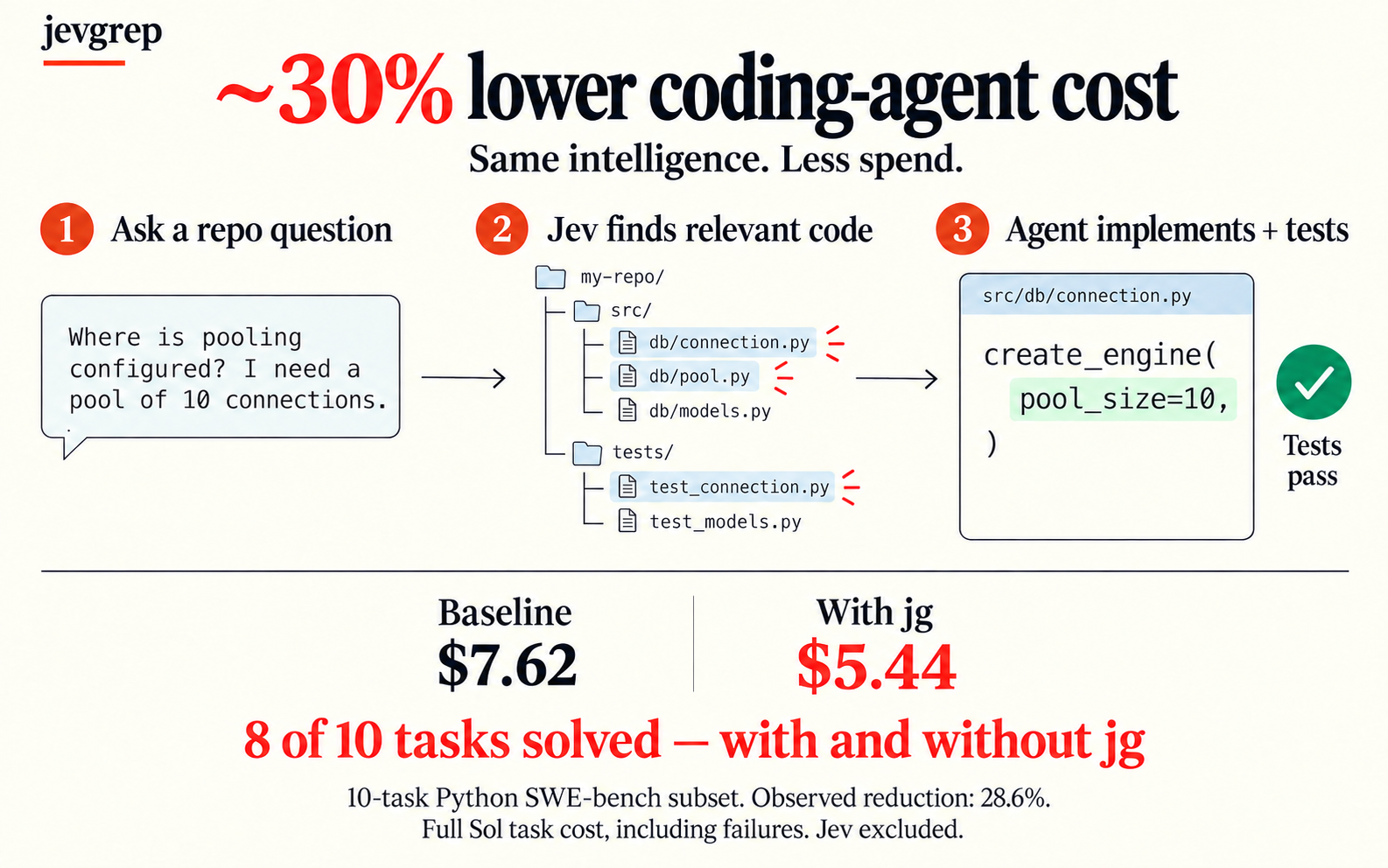
jg에 동작을 묻는 질문을 던지면, Jev가 폴더와 파일, 선언 하나하나가 그 질문과 관련 있는지 판단해요. 관련 있다고 본 가지만 따라 들어가고, 고른 소스는 고치지 않은 원문 그대로 줄 번호와 함께 돌려줘요. 답을 지어내지 않고 증거만 넘기니, 고치고 테스트하는 일은 에이전트에게 남아요.
이걸로 만든 사람들
자기 프로젝트(165개 파일)에서 잘 돼서 Wan2GP(2,761개 파일)에 한국어 질문 20개로 재 봤어요. 20개 모두 정답 파일이 맨 위였지만, 질문당 중앙값 65초와 약 500만 토큰이 들었다고 적었어요.
Accuracy on the large repo was excellent: the correct file was ranked first for all 20 queries.
자기 코딩 에이전트 하네스에 jg를 연결해 쓴 팀이에요. 범위가 분명한 질문엔 맞는 파일을 먼저 찾지만, 답이 없는 폴더에 물으면 파일의 41%를 관련 있다고 표시하고 5.4MB를 출력했다고 측정해 올렸어요.
We wired it into our coding-agent harness and it finds the right file first on well-scoped questions.
안에서는 이렇게 돌아가요
- 1
Claude Code · Codex → jevgrep 스킬
어떻게·어디서를 묻는 질문스킬 설명이 동작을 묻는 질문은 grep보다 jg로 먼저 찾으라고 에이전트에게 알려요.skills/jevgrep/SKILL.md - 2
jevgrep 스킬 → jg CLI
jg "질문" 경로CLI가 질문과 검색 루트를 읽고, jg auth로 저장해 둔 제공자 키를 불러와 검색을 시작해요.apps/cli/src/index.ts - 3
jg CLI → 저장소 파일
보낼 수 있는 파일만 읽기ignore 파일, 숨김·의존성·바이너리 파일, .env와 비밀값처럼 보이는 파일은 빼고 읽어요.packages/core/src/filesystem.ts - 4
저장소 파일 → Jev (AI Gateway 등)
폴더·파일 미리보기 묶음트리를 내려가며 미리보기를 묶어 보내고, 관련 있다고 판단된 가지만 더 열어 봐요.packages/core/src/retrieve.ts - 5
Jev (AI Gateway 등) → jg CLI
관련성 판단, 로컬 캐시판단은 AI SDK로 오가며 재시도와 요청 속도 한도를 지키고, 답은 로컬에 캐시해 둬요.packages/core/src/evaluator.ts - 6
jg CLI → stdout 컨텍스트
요약, 파일 목록, 원문 발췌상태와 파일 목록이 먼저, 줄 번호가 붙은 소스 블록, 선언 위치가 이어지고 End context.로 끝나요.apps/cli/src/render.ts
넣으면 이렇게 나와요
나한테 맞을까요
이럴 때 좋아요
- 낯선 저장소에서 어떤 동작이 어디 있는지, 이름은 모를 때
- Claude Code·Codex·OpenCode에 '찾아보고 고치기'를 맡길 때
- 요청에서 핸들러까지처럼 여러 파일에 걸친 흐름을 따라갈 때
- 어떤 테스트가 어떤 동작을 덮는지 찾을 때
이건 안 돼요
- Vercel AI Gateway, TypeSafe, OpenRouter, OpenCode Zen 또는 호환 엔드포인트의 키가 필요하고, jg auth로 저장해 둬야 해요.
- 검색하는 폴더의 소스가 Jev로 보내져요. .env와 비밀값처럼 보이는 파일은 빼지만, README는 이를 최선의 노력이지 보장은 아니라고 해요.
- 결과는 에이전트가 쓸 증거일 뿐, 관련 파일을 모두 찾았다는 보장은 아니에요.
- 정확한 심볼 이름이나 경로를 알면 rg나 직접 읽기로 충분해요.
발행 전에 Devalley 편집자가 검토했어요. 칼럼은 어떻게 만드나요
Jevgrep: find code by asking what it does
On a 2,761-file repo, one team's 20 questions all put the right file first
- Who
- Made by David Zhang (dzhng), for coding agents, and the people running them, who need the right files in an unfamiliar repository.
- When
- Public since 26 September 2026. The latest GitHub release is 0.8.0 (Windows support) on 1 October; tags reach v0.8.5.
- Where
- A skill for Claude Code, Codex, OpenCode and others. macOS, Linux or Windows, Node.js 22+. Jev runs through the provider you pick.
What was hard
You need to know where authentication is checked before a request reaches a handler, but you don't know what the function is called, so grep has nothing to grab. A coding agent in an unfamiliar repository spends part of every task just finding the right files, and pays for it.
What it does about it
Ask jg a question about behaviour, and Jev judges whether each folder, file and declaration is relevant to it. Only the branches that pass are explored, and the chosen source comes back untouched, with line numbers. It hands over evidence rather than an answer, so editing and testing stay with your agent.
What people made with it
After it worked on their 165-file project, they ran 20 Korean questions on Wan2GP (2,761 files): the right file came first every time, at a median 65 s and about 5M tokens each.
Accuracy on the large repo was excellent: the correct file was ranked first for all 20 queries.
A team that wired jg into their coding-agent harness: well-scoped questions find the right file first, but asking a folder with no answer marked 41% of files relevant and printed 5.4 MB.
We wired it into our coding-agent harness and it finds the right file first on well-scoped questions.
How it runs inside
- 1
Claude Code · Codex → jevgrep skill
A how / where questionThe skill's description tells the agent to start behaviour questions with jg rather than grep.skills/jevgrep/SKILL.md - 2
jevgrep skill → jg CLI
jg "question" rootThe CLI reads the question and search root, loads the provider key saved by jg auth and starts a search.apps/cli/src/index.ts - 3
jg CLI → Repository files
Reads eligible files onlyIgnored, hidden, dependency, binary, .env and credential-looking files are left out.packages/core/src/filesystem.ts - 4
Repository files → Jev (AI Gateway etc.)
Batches of folder and file previewsRetrieval walks the tree in bounded batches and opens only the branches judged relevant.packages/core/src/retrieve.ts - 5
Jev (AI Gateway etc.) → jg CLI
Relevance judgments, cached locallyJudgments go through the AI SDK with retries and a rate budget, and answers are cached on disk.packages/core/src/evaluator.ts - 6
jg CLI → stdout context
Summary, file list, verbatim sourceStatus and file list first, then source blocks with line numbers and declaration locations, ending in End context.apps/cli/src/render.ts
What goes in, what comes out
Is it for you
Good for
- Finding where a behaviour lives in an unfamiliar repository when you don't know its name
- Letting Claude Code, Codex or OpenCode look before they edit
- Following a flow that spans files, like a request on its way to a handler
- Finding which tests cover a given behaviour
Not for
- Needs a key for Vercel AI Gateway, TypeSafe, OpenRouter, OpenCode Zen or a compatible endpoint, saved with jg auth.
- Source under the search root is sent to Jev. .env and credential-looking files are left out, which the README calls best-effort, not a guarantee.
- The output is evidence for the agent, not a promise that every relevant file was found.
- When you know the exact symbol or path, rg or a direct read is enough.
Reviewed by Devalley’s editor before publishing. How the column is made