
Mesh Avatar Studio: 그림 한 장을 움직이는 2D 아바타로
앱 속 캐릭터를 이걸로 움직이던 팀이 안경 레이어를 제안하고 코드까지 보내, 하루 만에 기능이 됐어요
- 누가
- shinshin86이 만들었어요. 영어·일본어·중국어 안내가 있어요.
- 언제
- 2026년 10월 4일 저장소를 열었고, 10월 28일 런타임 mesh-avatar 0.4.0을 냈어요.
- 어디서
- Node.js 22.17+, Claude Code나 Codex. 편집기와 Live는 내 컴퓨터에서, Player는 크롬·엣지에서 설치 없이 돌아요.
이게 불편했어요
말하고 눈을 깜빡이는 2D 아바타는 보통 그림을 눈, 입 안쪽, 머리카락, 목처럼 부위별로 나눠 손으로 리깅해서 만들어요. 그림이 한 장뿐이라면 어디서부터 손대야 할지 막막했어요.
그래서 이렇게 풀어요
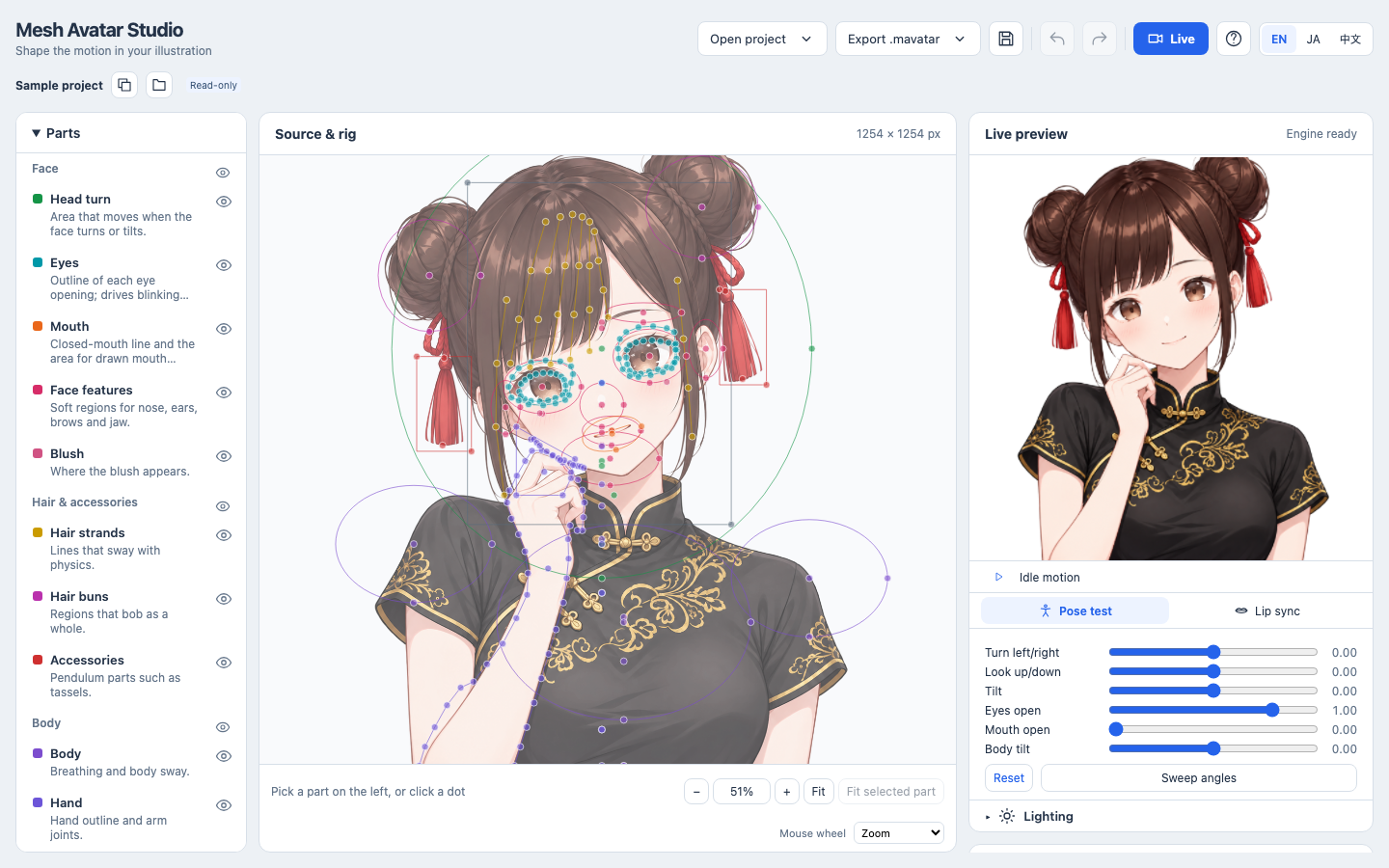
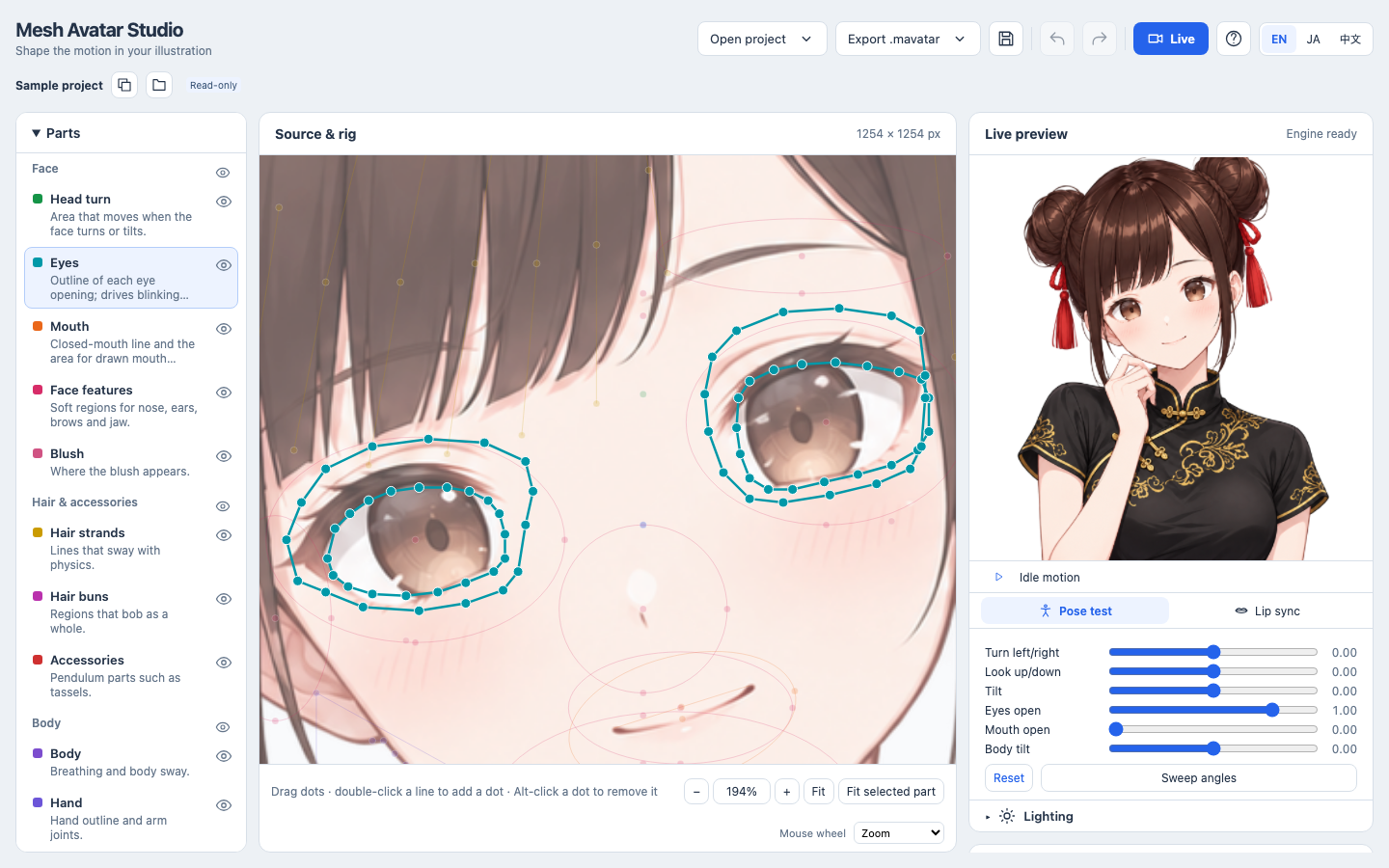
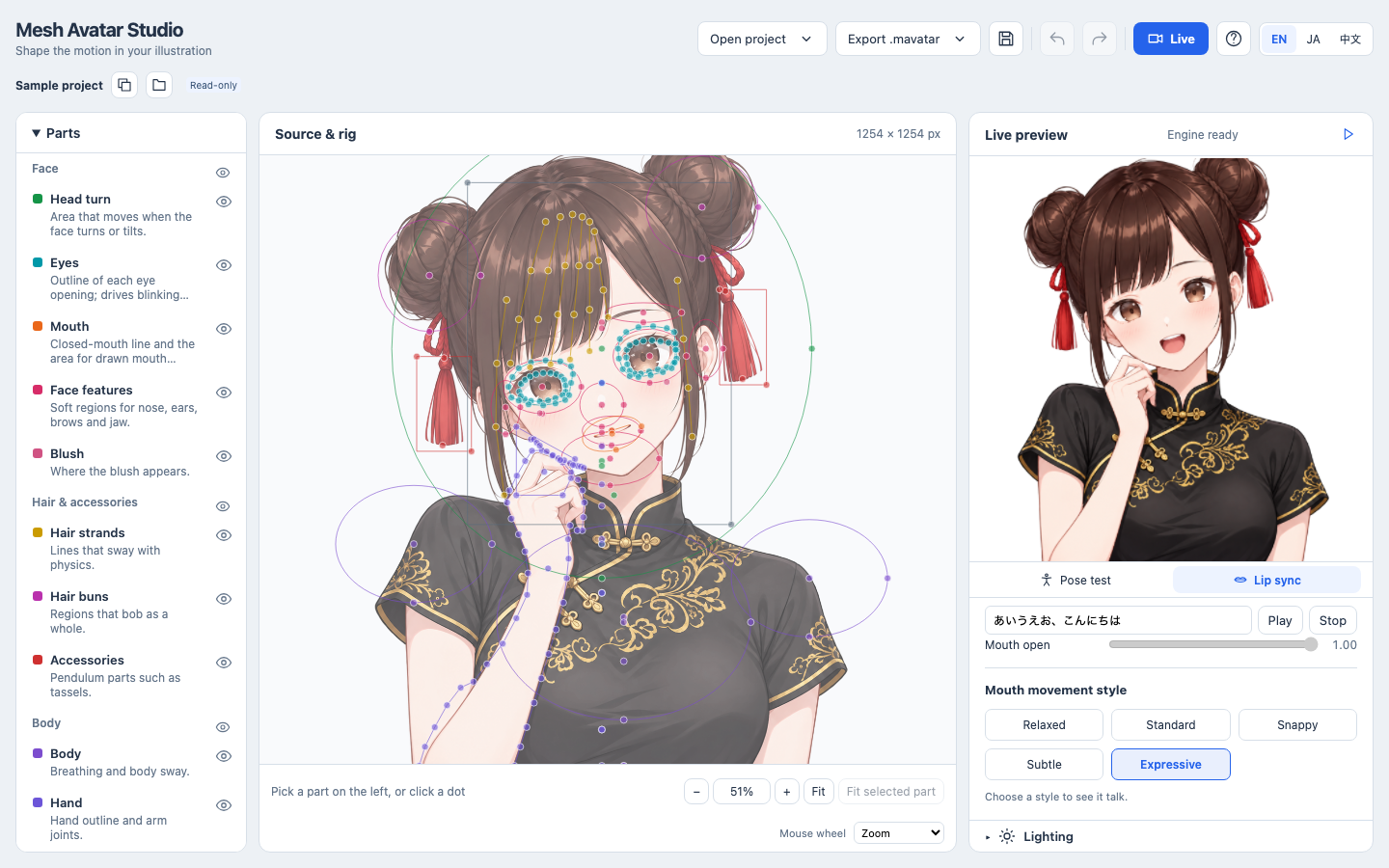
Mesh Avatar Studio는 그 리깅을 코딩 에이전트에게 맡겨요. 에이전트가 저장소의 안내서를 따라 확대 격자에서 눈·입·머리카락 좌표를 읽어 리그를 만들고, 그림을 레이어로 잘라 정해진 포즈로 직접 그려 보며 고쳐요. 어긋난 곳은 편집기에서 점을 끌면 미리보기가 바로 따라와요.
이걸로 만든 사람들
앱에 캐릭터를 띄우는 데 이 런타임을 쓰던 팀이, 안경 같은 소품을 켰다 껐다 하는 오버레이 레이어를 제안했어요. 다음 날 직접 보낸 PR이 합쳐졌어요.
We use the runtime (currently 0.3.0) to show a character in an app
VTuber를 직접 만들어 본 사람과 함께 Stella라는 아바타를 이 도구로 리깅하면서, 눈·입 안쪽·목을 따로 나누자는 의견을 남겼어요.
Happy to test any layering changes against our Stella pilot rig and report back with comparisons.
안에서는 이렇게 돌아가요
- 1
나 → Claude Code · Codex
그림 PNG + 안내서대로 만들어 달라는 요청에이전트는 먼저 좌표를 얼마나 정확히 읽는지 시험하고 점수를 알려 줘요.docs/agent-guide.md - 2
Claude Code · Codex → tools/ 스크립트
grid.py로 부위별 확대 격자전체 그림에서 어림하지 않고 10px, 눈은 5px 격자를 만들어 좌표를 읽어요.tools/grid.py - 3
tools/ 스크립트 → projects/<이름>/rig.json
rig.draft.json을 그림 위에 겹쳐 보기눈 윤곽이 흰자 가장자리에 2px 안쪽으로 맞을 때까지 고쳐요.tools/overlay.py - 4
tools/ 스크립트 → projects/<이름>/rig.json
build-layers.py: 레이어와 rig.json머리카락 마스크와 눈 레이어를 잘라 built/에 쓰고 완성된 rig.json을 만들어요.tools/build-layers.py - 5
tools/ 스크립트 → Claude Code · Codex
render-poses: 고정 포즈 프레임눈 감기, 고개 돌리기, 입 벌리기를 review/에 그려 보고, 어긋나면 세 번까지 다시 만들어요.tools/render-poses.mjs - 6
projects/<이름>/rig.json → Studio 편집기
npm run dev, 점을 끌어 다듬기부위를 고르고 점을 끌면 오른쪽 미리보기가 바로 따라와요.src/main.tsx - 7
Studio 편집기 → Live 페이지 · OBS
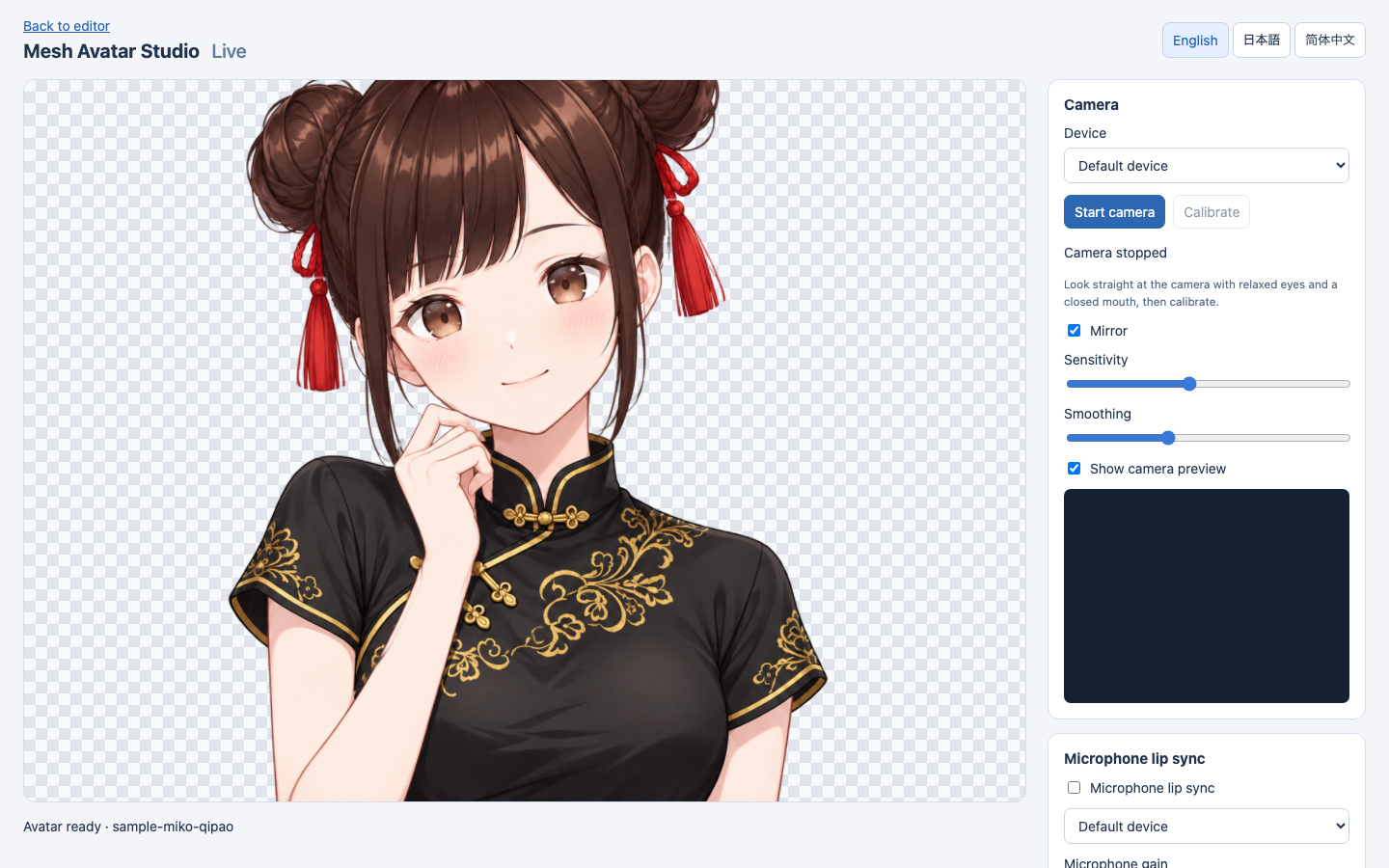
카메라·마이크로 움직이고 OBS 주소 복사카메라 영상과 소리는 내 컴퓨터에 남고, 움직임 숫자만 방송 화면으로 가요.live.html
넣으면 이렇게 나와요
나한테 맞을까요
이럴 때 좋아요
- 그림 한 장으로 방송용 아바타를 만들고 싶은 사람
- 웹 앱에 말하는 캐릭터를 넣고 싶은 개발자 (custom element, React 컴포넌트)
- Claude Code나 Codex를 이미 쓰고 있는 사람
이건 안 돼요
- 정면, 머리와 어깨가 보이는 PNG에서 가장 잘 돼요. 옆얼굴이나 얼굴을 가린 손, 얼굴을 덮은 머리카락은 품질을 떨어뜨려요.
- 그린 눈·입은 Codex의 이미지 생성이 그리고, 이때 그림과 마스크가 OpenAI로 가요. Claude Code는 이미지를 만들지 못해 요청만 준비해 줘요.
- 안내서는 Claude Opus 5.5나 GPT-6.1 Sol처럼 시각이 강한 모델을 권하고, 한 번 만드는 데 보통 수십 분 걸려요.
- 예제 캐릭터 Miko의 그림은 MIT가 아니라 따로 정한 이용 지침을 따라요.
발행 전에 Devalley 편집자가 검토했어요. 칼럼은 어떻게 만드나요
Mesh Avatar Studio: one illustration into a moving 2D avatar
A team running its in-app character on this runtime asked for glasses, sent the code, and it was merged within a day.
- Who
- Made by shinshin86, with guides in English, Japanese and Chinese.
- When
- The repository opened on October 4, 2026; the mesh-avatar runtime 0.4.0 came out on October 28.
- Where
- Node.js 22.17+ with Claude Code or Codex. The editor and Live run on your machine; the Player runs in Chrome or Edge with no install.
What was hard
A 2D avatar that talks and blinks is usually made by splitting the drawing into parts, eyes, inner mouth, hair, neck, and rigging each by hand. With nothing but one illustration, it was hard to know where to begin.
What it does about it
Mesh Avatar Studio hands that rigging to a coding agent. Following the repository's guide, the agent reads eye, mouth and hair coordinates from zoomed grids, builds the rig, cuts the image into layers and renders fixed poses to check and correct its own work. Whatever still looks off, you drag into place in the editor while the preview follows.
What people made with it
A team using the runtime to show a character in its app proposed overlay layers for items like glasses; its pull request was merged the next day.
We use the runtime (currently 0.3.0) to show a character in an app
Rigging an avatar called Stella with the tool alongside someone who built a VTuber by hand, they suggested separate layers for eyes, inner mouth and neck.
Happy to test any layering changes against our Stella pilot rig and report back with comparisons.
How it runs inside
- 1
You → Claude Code · Codex
A PNG and a request to follow the guideThe agent first tests how accurately it reads coordinates and reports the score.docs/agent-guide.md - 2
Claude Code · Codex → tools/ scripts
grid.py: a zoomed grid per partNo estimates from the full image: 10 px grids, 5 px for the eyes.tools/grid.py - 3
tools/ scripts → projects/<name>/rig.json
rig.draft.json drawn over the imageFixed until each eye outline follows the eye white within about 2 px.tools/overlay.py - 4
tools/ scripts → projects/<name>/rig.json
build-layers.py: layers and rig.jsonCuts the hair mask and eye layers into built/ and writes the complete rig.json.tools/build-layers.py - 5
tools/ scripts → Claude Code · Codex
render-poses: frames in fixed posesClosed eyes, head turns and an open mouth go to review/; up to three rounds of fixes.tools/render-poses.mjs - 6
projects/<name>/rig.json → Studio editor
npm run dev, then drag the dotsPick a part, drag its dots, and the preview on the right follows at once.src/main.tsx - 7
Studio editor → Live page · OBS
Camera and mic drive it; copy the OBS URLVideo and audio stay on your machine; only motion values reach the stream view.live.html
What goes in, what comes out
Is it for you
Good for
- Making a streaming avatar from a single drawing
- Developers who want a talking character in a web app (custom element, React component)
- Anyone already working with Claude Code or Codex
Not for
- Works best on a front-facing head-and-shoulders PNG; a three-quarter view, hands over the face or hair covering it lower the quality.
- Drawn eyes and mouths come from Codex's image generation, which sends the image to OpenAI; Claude Code can't make images, only the requests.
- The guide recommends a strong vision model such as Claude Opus 5.5 or GPT-6.1 Sol, and a run usually takes tens of minutes.
- The sample character Miko is not under the MIT License; her images follow their own usage guidelines.
Reviewed by Devalley’s editor before publishing. How the column is made