
Worktrunk: 에이전트마다 자기 폴더를 주는 git worktree CLI
Claude Code 둘에게 각자 폴더를 주고 wt merge로 합쳤더니 테스트 7개가 모두 통과했다는 레딧 후기
- 누가
- max-sixty가 만든 오픈소스(MIT 또는 Apache-2.0). Claude Code나 Codex를 여러 개 동시에 돌리는 개발자용이에요.
- 언제
- 2025년 10월 저장소가 생겼고, 최신 릴리스는 2026년 10월 20일 v0.81.0이에요.
- 어디서
- macOS·Linux(Homebrew, Cargo), Windows(winget, 명령 이름 git-wt)에서 돌아가는 Rust CLI예요. 내 PC의 git 저장소에서 써요.
이게 불편했어요
Claude Code를 두세 개 동시에 돌리면 같은 파일을 서로 고쳐 버려요. git worktree로 폴더를 나누면 되지만, 하나 만들 때마다 git worktree add -b feat ../repo.feat를 치고 cd로 옮겨야 했고, 끝나면 worktree와 브랜치를 따로 지워야 했어요.
그래서 이렇게 풀어요
Worktrunk는 worktree를 브랜치처럼 다뤄요. wt switch -c feat 한 줄이면 정해 둔 경로에 폴더와 브랜치가 생기고, -x claude를 붙이면 그 폴더에서 Claude가 바로 시작해요. 일이 끝나면 wt merge main이 커밋 메시지를 쓰고 main 위로 리베이스해 합친 뒤 worktree와 브랜치를 치워요.

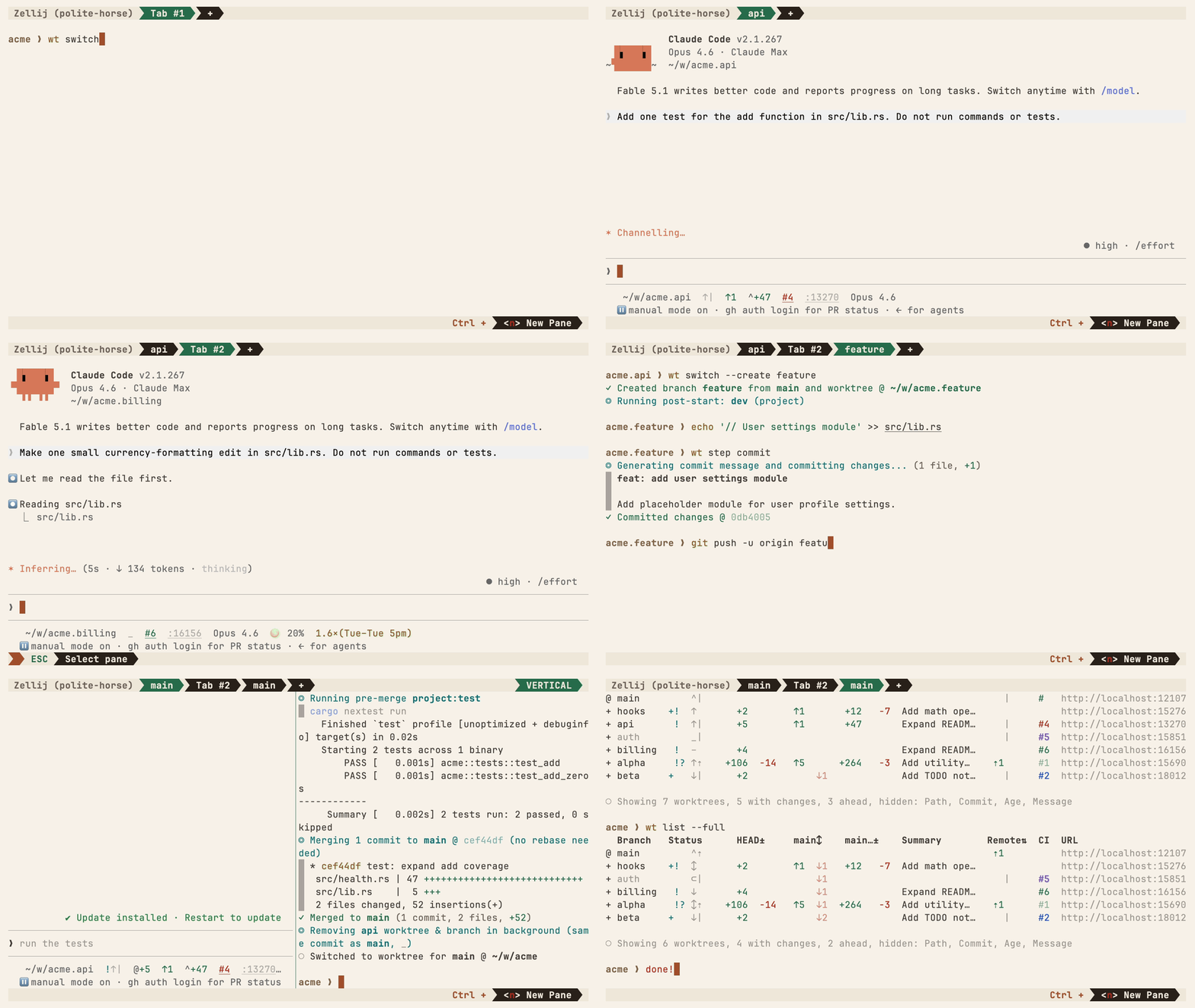
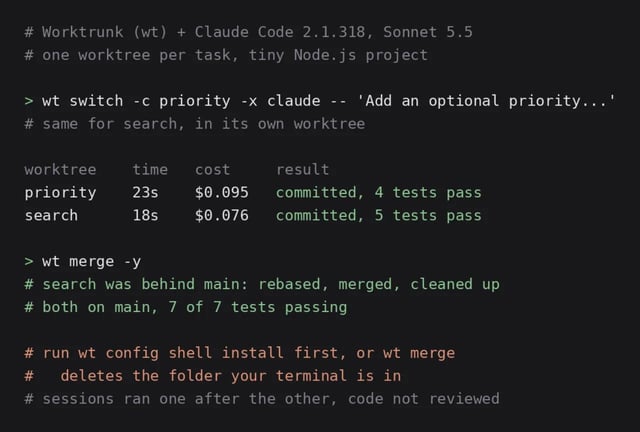
wt switch --create feature-auth✓ Created branch feature-auth from main and worktree @ ~/repo.feature-authwt merge main◎ Generating commit message and committing changes... (2 files, +53, no squashing needed)✓ Committed changes @ a1b2c3d◎ Merging 1 commit to main @ a1b2c3d (no rebase needed)✓ Merged to main (1 commit, 2 files, +53)◎ Removing feature-auth worktree & branch in background (same commit as main, _)○ Switched to worktree for main @ ~/repo
이걸로 만든 사람들
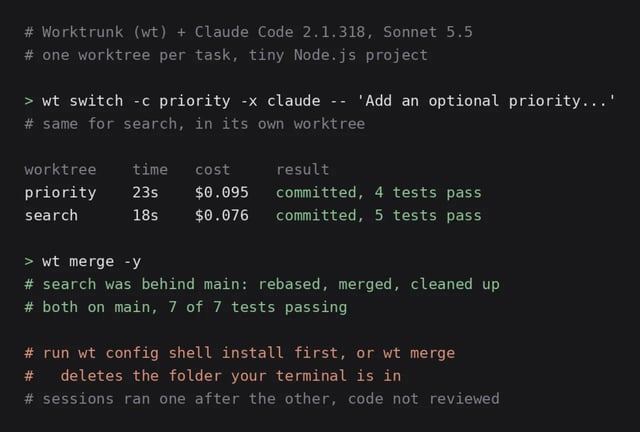
작은 Node.js 할 일 목록 앱에서 우선순위 필드와 검색 함수를 두 worktree의 Claude Code에 하나씩 차례로 맡겼어요. 각각 23초와 18초 걸렸고, 뒤처진 두 번째 브랜치는 wt merge가 리베이스해 줘서 main에서 테스트 7개가 모두 통과했어요.
After the first merge, the second branch was behind main, and wt merge rebased it before merging. Both ended up on main with 7 of 7 tests passing.
안에서는 이렇게 돌아가요
- 1
나 → wt (Worktrunk)
wt switch -x claude -c feature-a -- '할 일'브랜치 이름과 할 일을 한 줄에 넘겨요.src/commands/worktree/switch.rs - 2
wt (Worktrunk) → git worktree
경로 템플릿으로 폴더 계산, 브랜치와 worktree 생성worktree를 브랜치 이름으로 부르고, 폴더 위치는 설정한 템플릿에서 계산해요.src/commands/worktree/resolve.rs - 3
wt (Worktrunk) → Claude Code
-x: 새 폴더에서 claude 실행, -- 뒤를 과제로옮겨 간 뒤 -x의 프로그램을 실행하고, -- 뒤의 인자를 그대로 넘겨요.src/commands/worktree/switch.rs - 4
wt (Worktrunk) → 나
wt list: 브랜치별 변경, 앞선 커밋, CI 상태worktree마다 스테이징 변경, main보다 앞선 커밋, 안 올린 커밋을 표로 보여 줘요.src/cli/list.rs - 5
- 6
wt (Worktrunk) → main 브랜치
wt merge main: 스쿼시, 리베이스, 병합, 정리main 위로 리베이스해 fast-forward로 합친 뒤 worktree와 브랜치를 지워요.src/commands/merge.rs
넣으면 이렇게 나와요
나한테 맞을까요
이럴 때 좋아요
- 같은 저장소에서 Claude Code나 Codex를 여러 개 돌릴 때
- 작업마다 브랜치와 폴더를 만들고 지우는 일이 잦을 때
- 하루에 여러 세션의 결과를 main에 합칠 때
- worktree마다 개발 서버 포트를 따로 주고 싶을 때
이건 안 돼요
- wt config shell install로 셸 통합을 먼저 해야 wt가 폴더를 옮길 수 있어요(README 기준).
- Windows에서는 Windows Terminal의 wt와 이름이 겹쳐 git-wt로 설치돼요.
- 빌드 캐시 공유는 APFS, btrfs, XFS에서만 돼요.
- 레딧 후기 기준, -x에는 셸 명령이 아니라 프로그램을 넘겨야 해요(파이프는 -x sh -- -c).
Worktrunk: a git worktree CLI that gives each agent its own folder
Two Claude Code sessions in two worktrees, merged with wt merge: 7 of 7 tests passing on main
- Who
- Open source by max-sixty (MIT or Apache-2.0), for developers who run several Claude Code or Codex sessions at once.
- When
- Repository created in October 2025; latest release v0.81.0 on 20 October 2026.
- Where
- A Rust CLI for macOS and Linux (Homebrew, Cargo) and Windows (winget, as git-wt), used in git repos on your own machine.
What was hard
Run two or three Claude Code sessions at once and they edit the same files. Git worktrees keep them apart, but each one meant typing git worktree add -b feat ../repo.feat, then cd into it, and afterwards removing the worktree and the branch by hand.
What it does about it
Worktrunk treats worktrees like branches. wt switch -c feat creates the branch and its folder at a path from your template, and -x claude starts Claude inside it. When the work is done, wt merge main writes the commit message, rebases onto main, merges, and removes the worktree and the branch.
wt switch --create feature-auth✓ Created branch feature-auth from main and worktree @ ~/repo.feature-authwt merge main◎ Generating commit message and committing changes... (2 files, +53, no squashing needed)✓ Committed changes @ a1b2c3d◎ Merging 1 commit to main @ a1b2c3d (no rebase needed)✓ Merged to main (1 commit, 2 files, +53)◎ Removing feature-auth worktree & branch in background (same commit as main, _)○ Switched to worktree for main @ ~/repo
What people made with it
Two Claude Code sessions in two worktrees added a priority field and a search to a small Node.js app, in 23 and 18 seconds; after wt merge, main passed 7 of 7 tests.
After the first merge, the second branch was behind main, and wt merge rebased it before merging. Both ended up on main with 7 of 7 tests passing.
How it runs inside
- 1
You → wt (Worktrunk)
wt switch -x claude -c feature-a -- 'task'A branch name and the task, in one line.src/commands/worktree/switch.rs - 2
wt (Worktrunk) → git worktree
Path from the template, branch and worktree createdWorktrees are addressed by branch name; their paths come from a configurable template.src/commands/worktree/resolve.rs - 3
wt (Worktrunk) → Claude Code
-x: claude starts in the new folder, task after --After switching it runs the -x program and passes the arguments after -- to it.src/commands/worktree/switch.rs - 4
wt (Worktrunk) → You
wt list: changes, commits ahead, CI per branchA table of staged changes, commits ahead of main and unpushed commits for each worktree.src/cli/list.rs - 5
wt (Worktrunk) → LLM command for commits
The diff goes out, a commit message comes backIt renders the changes into a template for your configured LLM command and takes its message.src/llm.rs - 6
wt (Worktrunk) → main branch
wt merge main: squash, rebase, merge, clean upRebases onto main, fast-forwards, then removes the worktree and the branch.src/commands/merge.rs
What goes in, what comes out
Is it for you
Good for
- Running several Claude Code or Codex sessions on one repository
- Creating and removing a branch and folder for every task
- Merging work from several sessions a day
- Giving each worktree its own dev server port
Not for
- Run wt config shell install first, or wt can't change your directory (per the README).
- On Windows the name clashes with Windows Terminal's wt, so it installs as git-wt.
- Shared build caches work on APFS, btrfs and XFS only.
- From the Reddit write-up: -x takes a program, not a shell command; for pipes use -x sh -- -c.