
product_design_dongh: 기획서로 화면설계서까지 만드는 플러그인
아이디어 한 줄이 플로우 맵, 화면설계서, 디자인 시안, 검수표가 되는 Claude Code 플러그인
- 누가
- dongdongdongdongding이 MIT로 공개했어요. 기획자·PM·디자이너가 쓰도록 만든 키트예요.
- 언제
- 2026년 10월 30일 저장소가 열렸고, 같은 날 1.3.0(기획 분해·시안 비교·디자인 시스템)이 나왔어요.
- 어디서
- Claude Code 2.1.275 이상 플러그인이고, Codex와 claude.ai에도 스킬로 설치돼요. 빌드는 내 PC의 Python·Node로 돌아요.
이게 불편했어요
관리자 시스템을 추가 개발할 때마다 같은 내용을 네 번 써야 했어요. 기능정의서에 한 번, 화면설계서에 한 번, 디자인 툴에 한 번, 검수표에 한 번. 그러다 보면 기능 ID가 화면설계서에 없고, 예외 문구가 디자인과 다르고, 검수 시나리오에서 예외 하나가 빠져 있어요.
그래서 이렇게 풀어요
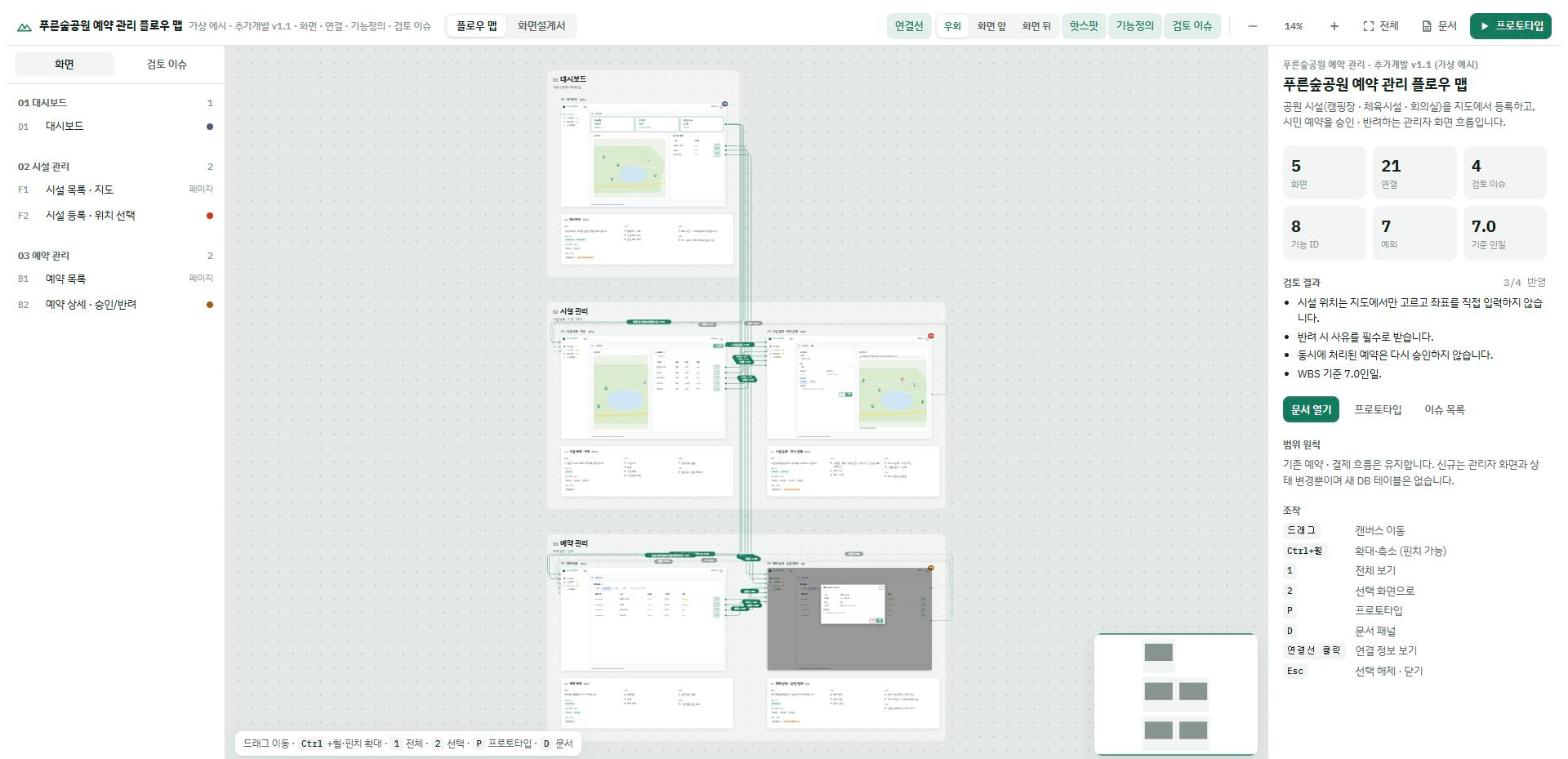
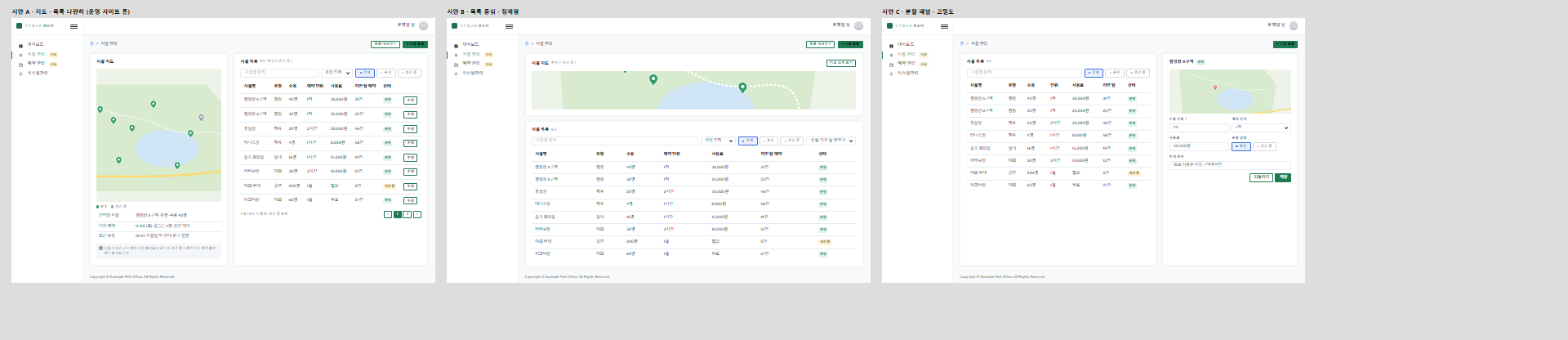
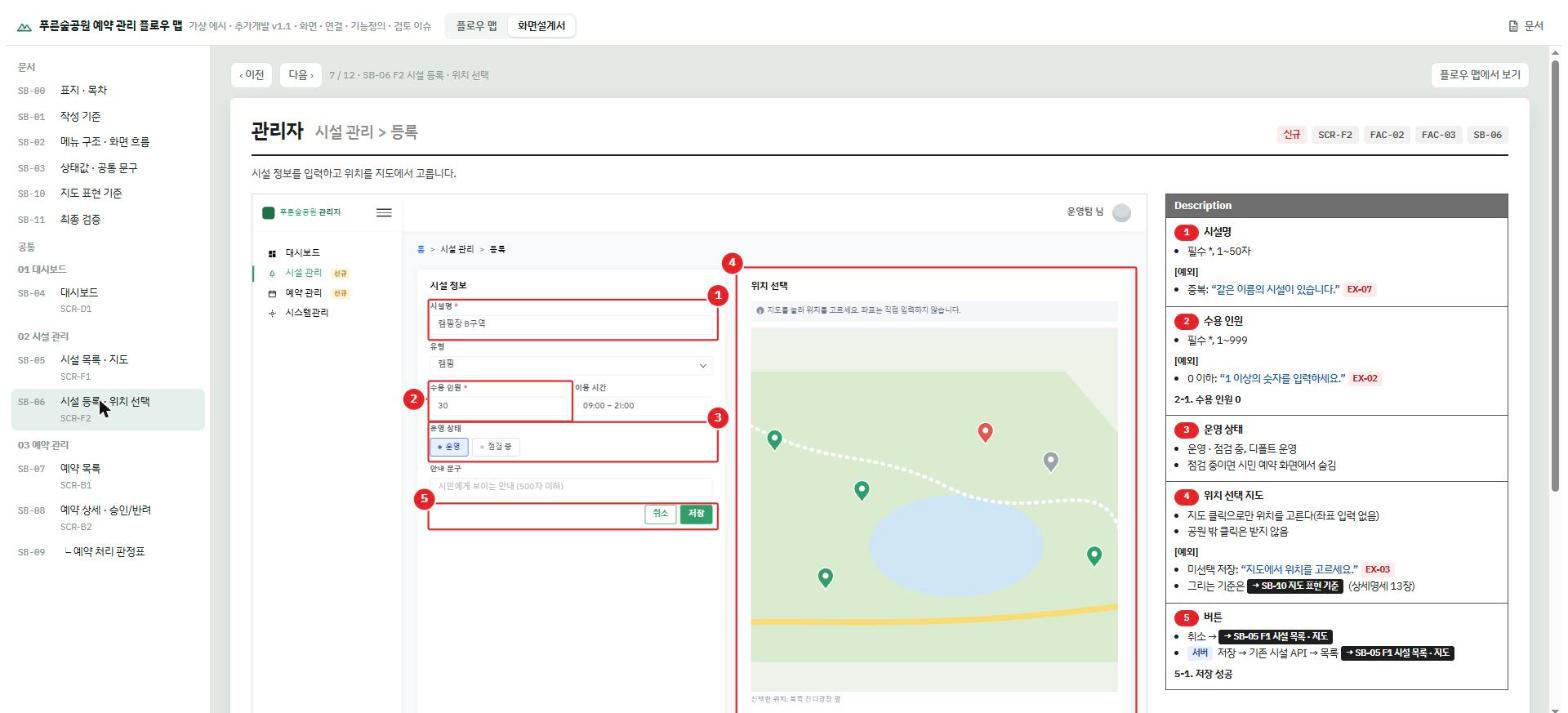
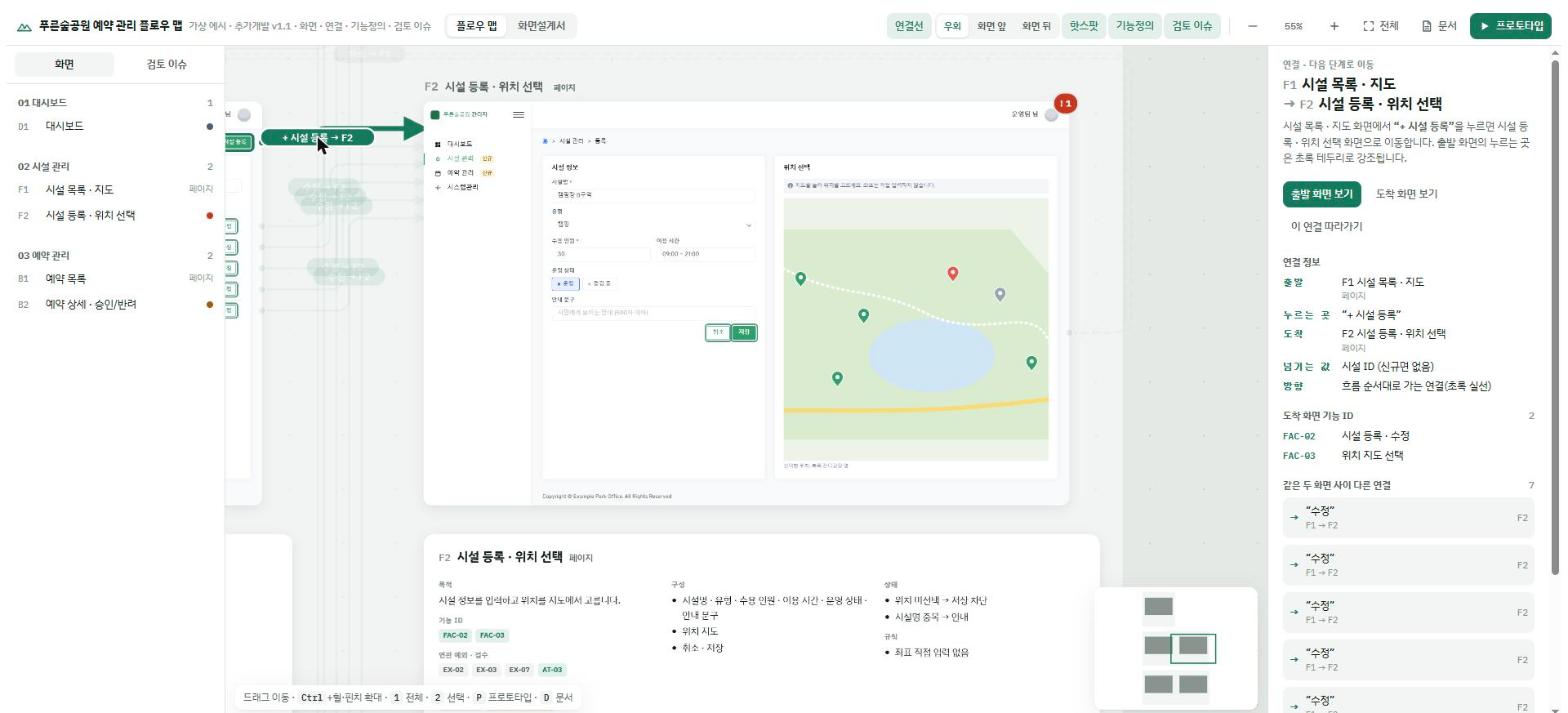
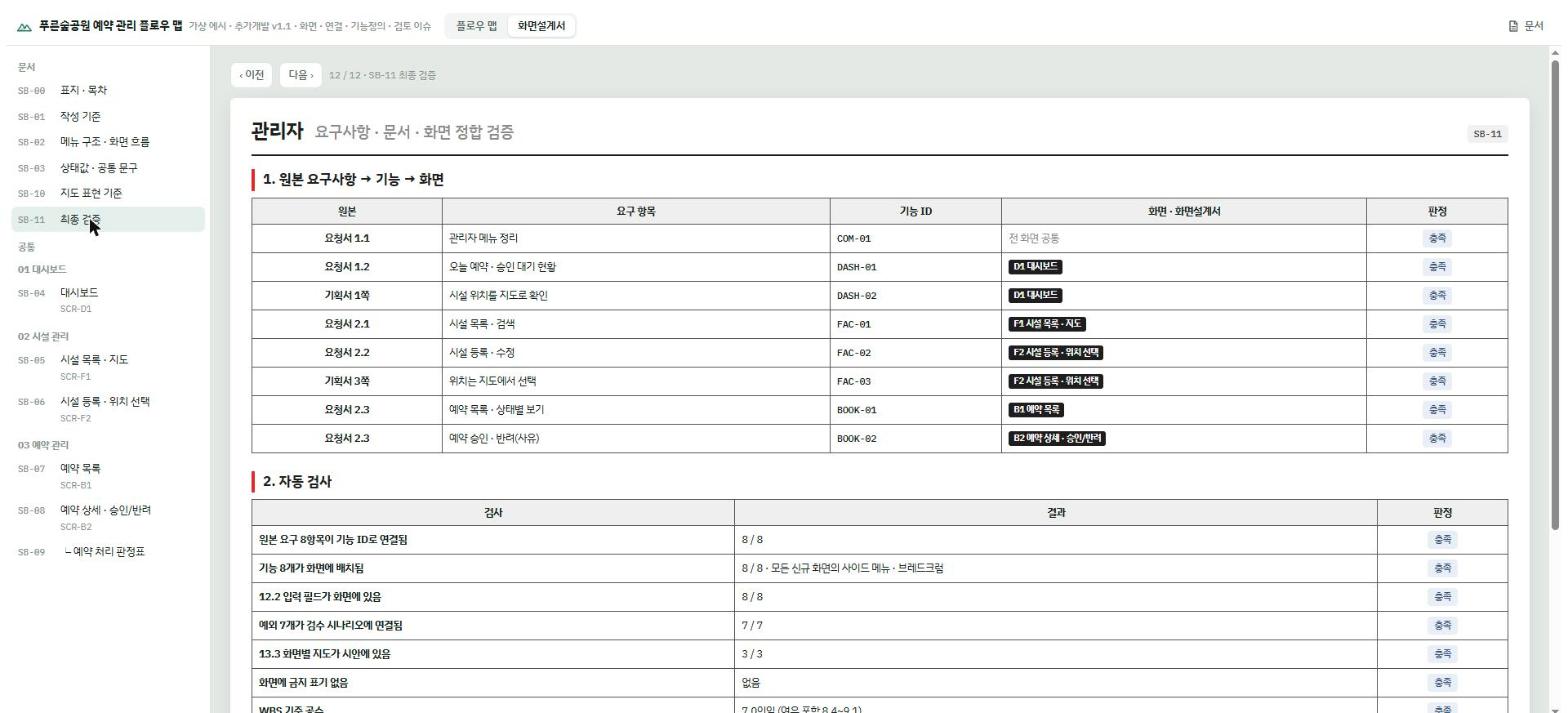
원본을 Markdown 문서 3종(기능정의서·상세명세·WBS)과 화면 시안 파일 하나로 두고, 플로우 맵·화면설계서·디자인 보드를 모두 그 데이터에서 만들어요. 화면을 캡처가 아니라 HTML로 그리기 때문에 「수용 인원」처럼 글자만 가리켜도 빨간 번호 마커가 제자리를 찾아 붙고, 버튼에 적힌 이동 대상에서 화면 사이 연결선이 저절로 뽑혀요. 마지막에는 요구 → 기능 ID → 화면이 끝까지 이어지는지 표로 판정해서 빠진 곳을 「확인 필요」로 띄워요.
안에서는 이렇게 돌아가요
- 1
기획자 → Claude Code · screen-spec-kit
/product_design_dongh:start + 기획서나 아이디어작업 폴더를 정하고, 인자 뒤에 아이디어 문장이 붙어 있으면 묻지 않고 기획 분해부터 시작해요.commands/start.md - 2
Claude Code · screen-spec-kit → spec-kit 문서 3종 · project.js
research/기획분해.md → 문서 3종 · project.js역할→메뉴→화면→기능→컴포넌트·동작→연결→예외까지 나눈 한 장이 기능정의서·상세명세·시안의 원본이 돼요.skills/plan-decompose/SKILL.md - 3
spec-kit 문서 3종 · project.js → Claude Design 캔버스
export_design.mjs → 화면별 .dc.html 보드시안 비교·화면·디자인 시스템 보드를 내보내고, 버튼의 data-go는 캔버스에서도 이동되는 링크로 바꿔요.scripts/export_design.mjs - 4
Claude Design 캔버스 → spec-kit 문서 3종 · project.js
import_design.mjs --apply → design-import/사람이 캔버스에서 고친 보드를 되가져와, 이후 빌드와 내보내기에서 원래 시안보다 먼저 써요.scripts/import_design.mjs - 5
spec-kit 문서 3종 · project.js → build_kit.py
kit.json · theme.css · project.js · sb-pages.js · docs문서에서 센 기능·예외·검수 개수가 kit.json의 expect와 다르면 빌드를 멈춰요.scripts/build_kit.py - 6
build_kit.py → flowmap.html
플로우 맵 + 화면설계서 + 문서 패널공통 엔진 템플릿에 프로젝트 파일을 끼우고, kit.json의 lang에 맞춰 화면 문구를 한·영·중·일로 바꿔 한 HTML로 써요.scripts/build_kit.py - 7
Claude Code · screen-spec-kit → flowmap.html
audits/flowmap-sb.js → 잘림 · 겹침 · 확인 필요 개수127.0.0.1로 연 플로우 맵에서 번호 원 겹침과 잘림, 최종 검증의 확인 필요 개수를 세요.scripts/audits/flowmap-sb.js
넣으면 이렇게 나와요
나한테 맞을까요
이럴 때 좋아요
- 관리자 시스템 추가 개발에 낼 화면설계서를 써야 하는 기획자
- 공공·SI 프로젝트 형식(빨간 번호 마커, Description, 판정표)의 SB가 필요할 때
- 아이디어 한두 줄로 메뉴·화면·기능 목록부터 빨리 잡고 싶을 때
- 기능정의서와 화면설계서, 검수표가 자꾸 어긋나던 팀
- 영어·중국어·일본어로 산출물을 내야 할 때
이건 안 돼요
- 자동 검수에는 Claude in Chrome, 결과 게시에는 Artifact 도구가 필요해요(README 기준).
- Codex에서는 브라우저 검수와 Artifact 게시 대신 로컬 서버 주소와 파일로 결과를 보여 줘요.
- file://로 열면 일부 기능이 막혀서 로컬 서버로 열어야 해요.
- 비밀번호와 키는 다루지 않아요. 로그인이 필요한 운영 사이트는 직접 로그인해야 해요.
발행 전에 Devalley 편집자가 검토했어요. 칼럼은 어떻게 만드나요
product_design_dongh: from a plan to a screen spec
A Claude Code plugin that turns one line of an idea into a flow map, a screen spec, design drafts and a QA sheet
- Who
- Released under MIT by dongdongdongdongding, as a kit for planners, PMs and designers.
- When
- The repository opened on October 30, 2026, the same day as version 1.3.0 (plan breakdown, draft comparison, design system).
- Where
- A plugin for Claude Code 2.1.275 or later, also installable as skills in Codex and claude.ai. Builds run locally on Python and Node.
What was hard
Every round of admin-system work meant writing the same thing four times: in the feature spec, the screen spec, the design tool and the QA sheet. Then they drift. A feature ID never reaches the screen spec, an error message in the design differs from the doc, and one exception is missing from the test scenarios.
What it does about it
The source is three Markdown docs (feature spec, detailed spec, WBS) plus a single file of screen drafts, and the flow map, screen spec and design boards are all built from that data. Screens are drawn in HTML rather than pasted as screenshots, so pointing at a label like "capacity" is enough for a red numbered marker to find its place, and the links between screens are pulled from the targets written on each button. At the end a table traces each requirement to a feature ID and a screen, and anything missing shows up as "needs checking".
How it runs inside
- 1
Planner → Claude Code · screen-spec-kit
/product_design_dongh:start + a plan or an ideaIt picks the working folder, and if an idea follows the arguments it goes straight to breaking the plan down.commands/start.md - 2
Claude Code · screen-spec-kit → spec-kit docs · project.js
research/기획분해.md → three docs · project.jsOne sheet, from roles and menus down to screens, features, links and exceptions, becomes the source of the specs.skills/plan-decompose/SKILL.md - 3
spec-kit docs · project.js → Claude Design canvas
export_design.mjs → one .dc.html board per screenExports draft, screen and design-system boards, turning each data-go button into a link that works on the canvas.scripts/export_design.mjs - 4
Claude Design canvas → spec-kit docs · project.js
import_design.mjs --apply → design-import/Brings back boards a person edited on the canvas; later builds and exports use them ahead of the original drafts.scripts/import_design.mjs - 5
spec-kit docs · project.js → build_kit.py
kit.json · theme.css · project.js · sb-pages.js · docsIf the counts of features, exceptions and tests read from the docs differ from kit.json's expect, the build stops.scripts/build_kit.py - 6
build_kit.py → flowmap.html
flow map + screen spec + docs panelFills the shared engine template with the project files, its interface in the language kit.json's lang names.scripts/build_kit.py - 7
Claude Code · screen-spec-kit → flowmap.html
audits/flowmap-sb.js → clipped, overlapping, uncheckedOn the flow map served from 127.0.0.1 it counts overlapping or clipped markers and the open items in the final check.scripts/audits/flowmap-sb.js
What goes in, what comes out
Is it for you
Good for
- Planners who owe a screen spec for the next round of admin-system work
- Projects that expect the Korean public-sector screen spec format: red markers, descriptions, verdict tables
- Getting from a one-line idea to a list of menus, screens and features quickly
- Teams whose feature spec, screen spec and QA sheet keep drifting apart
- Deliverables in English, Chinese or Japanese
Not for
- The automatic audit needs Claude in Chrome, and publishing needs the Artifact tool (per the README).
- In Codex it shows results as a local server address and files instead of a browser audit and Artifact links.
- Opened as file:// some features are blocked, so it is served locally.
- It handles no passwords or keys; you sign in to a live site yourself.
Reviewed by Devalley’s editor before publishing. How the column is made